Introduction
Ask a workshop where its 120-grit discs live and you will be shown a drawer, a torn box, a zip bag, and a stack of discs of unknown grit stuck fuzz-to-abrasive in a corner — each one slowly ruining the next. Hook-and-loop sanding discs are consumables, but they are not cheap, and they die young in bad storage: edges curl, abrasive faces pick up grit and sawdust contamination, and the loop backing gets crushed until the disc flies off the sander mid-pass.
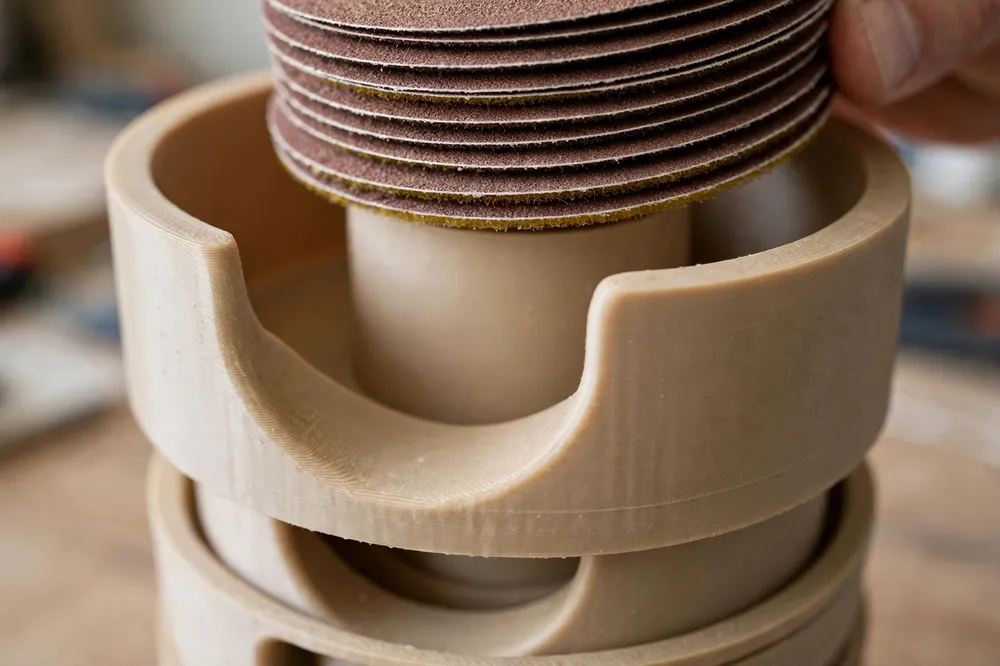
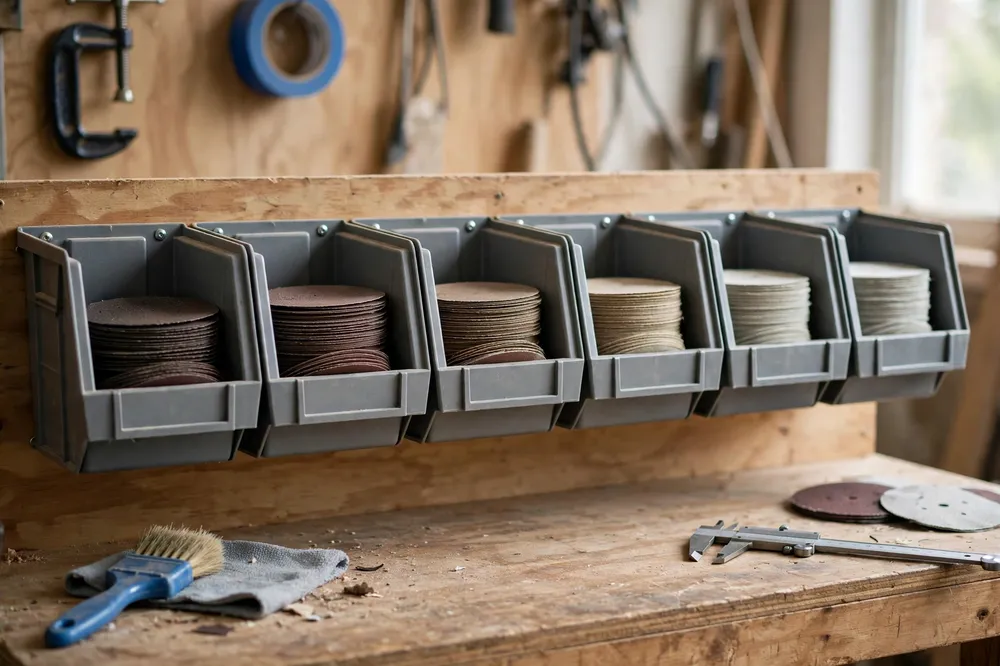
A 3D printed sanding disc storage tower treats discs like the precision consumables they are. Each grit gets its own compartment sized to the disc, holding a flat stack behind a low front lip, with a finger scoop so the top disc lifts out cleanly. A vertical tower keeps six or eight grits in the footprint of one, every grit identifiable at a glance, every disc flat, clean, and ready.
This guide covers sizing the compartments, printing the tower in stackable sections, and setting up a grit system you will actually keep.
What You Need
Materials and tools
- A home 3D printer with a build area of about 160 mm square or more — a 5-inch disc is 125 mm, and its compartment needs a little room around it
- PLA filament is ideal: cheap, stiff, and this organizer lives indoors; PETG if your shop is hot or humid
- A digital caliper or ruler to measure your discs’ true diameter
- Your disc collection, sorted by grit, to count stack heights
- A label maker or paint pen for grit numbers (the model can also carry them)
- A random orbital sander, to appreciate the before-and-after
- Optional: a soft brush for cleaning discs before they go back
Measure your discs. “5-inch” discs are nominally 125 mm, but brands vary by a millimeter or two, and a compartment that is exactly disc-sized becomes a wrestling match.
Suggested print settings
- Layer height: 0.28 mm — big simple shells print fast and look fine doing it.
- Walls: 3 to 4 perimeters. Compartments need stiffness, not armor.
- Infill: 15 to 25 percent. The tower carries paper, not anvils.
- Top and bottom layers: 4.
- Orientation: Print each compartment flat on its base, opening up.
- Supports: None, with a gently sloped finger scoop instead of an overhanging one.
Design Considerations
1. Compartment sizing: snug, not tight
Model each compartment with an inside diameter about 3 to 4 mm larger than your discs, and walls that are vertical and smooth. Discs should drop in under their own weight and slide out without their edges catching. Depth per compartment: enough for a working stack of 15 to 25 discs — roughly 25 to 40 mm of stack height — plus the lip. Deeper storage belongs in a bulk box; the tower is your working stock, refilled from bulk, which keeps most discs sealed and fresh.
2. The finger scoop and front lip
Retrieval is the design detail that decides whether a storage system gets used. Cut a scoop into the front of each compartment — a curved notch reaching about two-thirds down the stack — so your thumb and finger can pinch the top disc’s edge and lift it out without bending it. The remaining front lip, left and right of the scoop, keeps the stack from sliding out when the tower is bumped or carried. Model the scoop floor as a smooth ramp, not a step, so discs slide over it during loading too.
3. Stackable sections with positive location
A monolithic eight-grit tower is a long print and an inflexible object. Print the tower as identical sections that stack: a locating rim on each section’s top edge that nests into the base of the one above, so the stack registers straight and cannot skate apart. A quarter-turn or a simple pin-and-socket at the back adds security if the tower lives somewhere vibration-prone. Sections also mean a new grit is one more section, printed in an evening — the system grows at the speed of your sanding habits.
4. Grit identification that survives dust
Mold the grit number into each section’s front face as raised or recessed characters in the model itself — 60, 80, 120, 180, 240, 320, and beyond read instantly and cannot peel, fade, or fall off in a dusty shop. If your modeling tool makes text painful, a smooth recessed panel sized for a label-maker strip is the acceptable second best. Order the tower coarse at the bottom, fine at the top: the heavy stacks sit low, and the order matches the sequence you work through on a project.
Step-by-Step: Printing the Tower
- Sort and count your discs by grit; note which grits you burn through (the coarse and medium usually) — those get the deeper or double sections.
- Measure disc diameter across several brands in your stock and size the compartment to the largest plus clearance.
- Model one section with scoop, lip, stacking rim, and molded grit number.
- Print a test section, load it with a full stack, and practice pulling discs: top disc out cleanly, stack stays put, no curled edges.
- Print the remaining sections and stack the tower, coarse at the bottom. If the stack feels tippy on your bench, print a wider base section or wall-mount the sections in a row instead — the same model serves both.
Step-by-Step: Setting Up Your Grit System
- Brush off any discs returning to storage; a disc put away dusty contaminates the stack and the next workpiece.
- Load each section with its grit, abrasive faces all the same way — face-up stacks are easiest to inspect for wear.
- Adopt the half-worn rule: a disc with life left goes back on top of its stack, so it is the next one used rather than aging at the bottom while fresh discs cycle above it.
- Keep bulk stock sealed elsewhere and refill the tower a few discs at a time; the tower is a dispenser, not a warehouse.
- Retire discs honestly. A disc whose edges are torn or whose backing no longer grabs goes in the bin, not back in the tower to disappoint you mid-project.
This tower is the natural sibling of “Sandpaper Organizer and Storage Box: 3D Print a Grit-Sorted System for Your Workshop” — sheets sorted by grit in the box, discs sorted by grit in the tower, and a workshop where every abrasive you own can be identified in the dark.
Tips for Better Results
- Print the base section in a different color from the stack, and grit sections in one consistent color — the tower reads as one deliberate object, not a pile of prints.
- Add a spent-disc slot: one open tray section on top for discs awaiting judgment. It stops the slow contamination of good stacks by maybes.
- Store the tower away from the sanding station’s dust plume or add a simple printed lid for the top section; discs stored clean stay sharp longer.
- Keep one section for specialty discs — mesh abrasives, interface pads, polishing discs — so they stop living in a mysterious bag.
- Pair the tower with your sander’s home. A sander parked beside its tower, as in the setup around “Contour Sanding Blocks: 3D Print Custom Blocks for Curved Trim and Furniture Repairs,” means sanding starts in seconds instead of after a rummage.
Common Mistakes to Avoid
- Compartments exactly disc-diameter. Discs swell slightly with humidity and edges catch; the 3 to 4 mm of clearance is what makes the system feel effortless.
- One deep bin for all grits. Mixed stacks defeat the entire purpose — you end up reading the tiny print on disc backs under shop dust, which is the drawer system with extra steps.
- No scoop. Lifting a flat disc out of a snug round compartment without a scoop means bent discs and fingernail archaeology. The scoop is non-negotiable.
- Stacking too many sections without location. Plain butt-stacked sections skate and eventually avalanche. The locating rim costs nothing and prevents the one accident that mixes every grit at once.
- Storing discs abrasive-to-loop in alternating directions. Mixed orientation makes stacks uneven and retrieval fiddly. One direction, always.
Care, Storage, and When to Choose an Alternative
Blow the tower out occasionally, check scoop edges for cracks, and reprint any section that takes damage — sections mean repairs are small. PLA towers live happily for years on a shelf; if yours stands near a sunny window in a hot shop, PETG removes the one environmental worry.
Alternatives: the original cardboard boxes work until they tear, which is immediately; zip bags keep dust off but hide grits and curl edges; a simple dowel spindle through the center holes suits hole-pattern discs but offers no dust protection and mixes retrieval into a lift-the-whole-stack affair. For a home workshop running one main sander size, the printed tower’s combination of sorting, protection, and one-hand retrieval is hard to beat. If you run several sander sizes — 5-inch and 6-inch, say — print a second, shorter tower rather than compromising one to fit both.
FAQ
How many discs should each compartment hold?
A working stack of 15 to 25 discs per grit is the sweet spot: enough that you are not refilling constantly, shallow enough that the bottom discs are not crushed and retrieval stays easy. Keep bulk packs sealed in a drawer and top up the tower as needed.
Will the tower fit 6-inch discs too?
The model scales, but print a dedicated tower for 6-inch discs rather than one compromise size. Compartments sized for 150 mm discs let 125 mm discs slump and curl; each size deserves its own snug home.
My discs have different hole patterns. Does that matter?
Not for storage. Hole patterns matter on the sander, not in the tower. If you stock two patterns in the same grit (for different sanders), give them neighboring sections and mold a small dot code beside the grit number to tell them apart.
Can I wall-mount the sections instead of stacking?
Yes — the same sections mount in a row on a simple printed or wooden rail, or individually with screws through a back flange you add to the model. A row above the bench is the most glanceable layout of all if you have the wall space.
Conclusion
Sanding discs die in drawers, not on sanders. A printed storage tower — snug compartments, honest grit numbers molded in, a scoop that respects your fingernails, sections that grow with your habits — keeps every disc flat, clean, identifiable, and one pinch away from the pad.
Print one section for your most-used grit and live with it for a week. The rest of the tower will follow, because the drawer of mystery discs will suddenly feel as outdated as it is.