Introduction
Cordless tools multiply quietly. The drill came first, then the driver, then the saw that shared the batteries, and one day the bench is a parking lot of tool bodies lying on their sides, rolling into each other, hiding the one you need under the one you do not. Drawers help until they overflow. What these tools want is a wall — each body parked in its own cradle, visible at a glance, grabbable with one hand.
Printed wall mounts are the tidy answer, and they are shaped by a principle that should be stated plainly before anything else: these mounts are for storage only. A tool rests in its holder, switched off, while it is not in use — the same way a coat rests on a hook. The holder never connects to the tool’s electrics, never touches its battery contacts, and is never part of charging. Batteries are stored and charged exactly as their manufacturer directs, on their own chargers and shelves; the mount’s only job is to cradle an idle tool body safely off the bench. Keep that boundary and a printed mount is a simple, safe, endlessly customizable piece of storage.
Because every brand shapes its tool bodies differently, a printed cradle fitted to your tools beats a generic hook every time. This guide covers designing cradle mounts that hold securely without stressing the tool, printing them strong, and fixing them to the wall so they stay there.
What You Need
Each mount is a modest print. The real work is measuring your tools and mounting into something solid.
Materials and tools
- A home 3D printer with a build volume to suit your largest tool body
- PETG filament for mounts that carry real weight; ASA is a good hot-garage upgrade
- The tools you plan to store, on the bench for measuring
- Calipers and a tape measure for body dimensions
- A stud finder if you mount on a framed wall
- A cordless drill and proper screws: long wood screws into studs, or rated fixings for masonry
- A level for lining up a row of mounts
- Optional: thin foam or felt pads to line cradles for tools you want to baby
Batteries add serious weight. Decide whether each tool will be stored with its battery fitted or removed, and design for the heavier case — most makers store batteries separately on their charging shelf, which keeps mounts lighter and follows the battery makers’ own storage guidance.
Suggested print settings
- Layer height: 0.24 to 0.28 mm — these are chunky parts; fine layers buy nothing.
- Walls: 6 perimeters minimum on the cradle and flange. This is a load-bearing holder.
- Infill: 50 percent, gyroid or grid. Do not skimp; the mount carries the tool every hour of every day.
- Top and bottom layers: 5 or more.
- Orientation: Print with the mounting flange flat against the bed so the cradle arms grow upward in strong layers.
- Supports: Gentle cradle curves should need few or none; design the underside flat where you can.
Design Considerations
A wall mount fails in one of two ways: the print breaks, or the fixing pulls out. Good design prevents both, and the four decisions below are where it happens.
1. Cradle the body, clear the controls
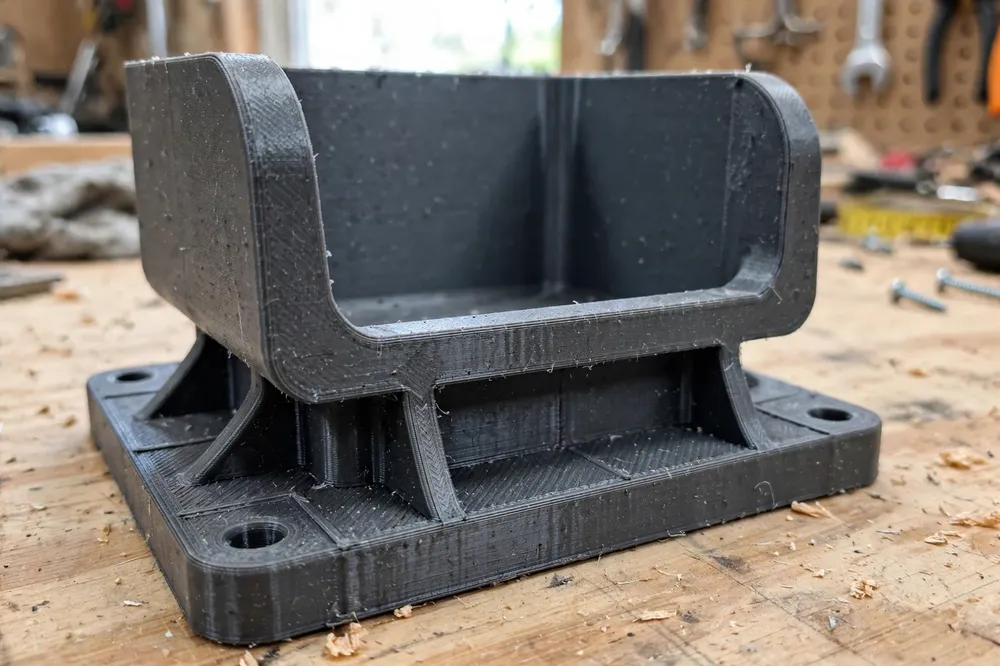
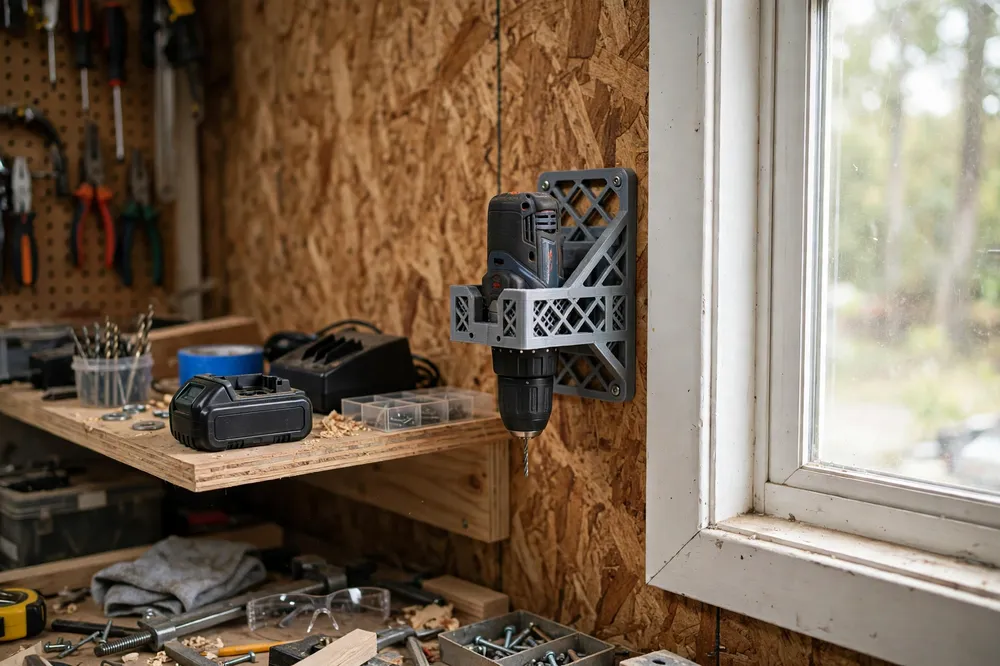
Shape the cradle to the tool’s body shell — under the motor housing of a drill, around the gearbox collar of a driver, beneath the base of a saw. Trace the silhouette and offset it by 1.5 to 2 mm so the tool drops in without a fight. Keep the cradle clear of triggers, switches, vents, and adjustment knobs: the tool should rest on its strong shell, with nothing pressing a control and nothing blocking the vents it cools through after work. A small raised lip at the front of the cradle stops the tool sliding forward when the wall gets bumped.
2. One tool, one mount, one hand
Design for the grab. The tool should lift out upward or tip out toward you with one hand, because the other hand is always holding something. Deep pockets that need two hands and a wiggle will be bypassed within a week. Test the motion with the actual tool: if you cannot park it and retrieve it absent-mindedly, reshape the cradle until you can.
3. A flange that respects the fixings
The mounting flange spreads the load and carries the screws. Make it generous — wider than the cradle, with four screw holes positioned so at least two can land in a stud or solid fixing. Keep the holes away from the cradle junction, thicken the flange around them, and model countersinks so screw heads sit flush and cannot chafe the tool. On a framed wall, plan the row of mounts around your stud spacing from the start, or mount a plywood backer board to the studs and fix mounts anywhere on the board.
4. Keep the load path short and low
A tool hanging far from the wall is a lever working against your screws all day. Tuck cradles close to the wall, support the tool low on its body rather than high and tippy, and for heavier bodies like circular saws add a lower shelf lip so the weight bears down into the mount instead of prying outward. If a mounted tool can be wiggled loosely by hand, the design or the fixing is wrong — find out which before trusting it.
Step-by-Step: Printing and Assembly
- Choose your storage pattern: batteries on or off the tools, and which tools get mounts.
- Measure each tool body at its cradle point — width, depth, and the silhouette the mount must clear.
- Model the cradle and flange with clearances for controls and vents, four flush screw holes, and a front lip.
- Slice it strong: 6 walls, 50 percent infill.
- Print one mount for your most-used tool first.
- Do a bench load test. Fix the mount to a board, park the tool, and leave it loaded for a day, checking for flex or cracking.
- Test the grab — park and retrieve the tool twenty times one-handed. Adjust the cradle until it is thoughtless.
- Print the remaining mounts once the pattern is proven, sized per tool from the same design family.
Step-by-Step: Mounting and Organizing the Row
- Plan the row on the wall with tape first: daily tools at chest height, heavy bodies lower, rarely used ones at the ends.
- Find your fixings. Studs where possible; otherwise a plywood backer board screwed to the studs, or rated masonry fixings.
- Fix the first mount level and park its tool as a reference for the row’s height.
- Work along the row, spacing mounts so tool handles and chucks clear each other with room for your hand.
- Park every tool and step back. Triggers clear, vents open, nothing touching, every tool grabbable.
- Set up the battery shelf nearby — batteries stored and charged on their own chargers, per their makers’ instructions, not in the mounts.
- Test the wall with a firm downward pull on each mount. Solid is the only acceptable answer.
Tips for Better Results
- Store batteries separately. A charging shelf beside the mounts keeps weight off the prints and follows the battery manufacturers’ guidance for storage and charging.
- Print mounts in your tool brand’s color family. It looks sharp, and the right mount visually calls to the right tool.
- Add a felt pad where a prized tool’s shell meets the cradle — a two-minute kindness that prevents scuffs.
- Keep mounts consistent with the rest of the wall. Our guide “Cordless Tool Battery Storage Rack: 3D Print Wall Holders to Organize Your Workshop” covers the matching battery side of this storage system, holders for the packs themselves.
- Leave one empty mount position. The next tool is already on your wish list; pretend otherwise and the wall will need rearranging by Christmas.
Common Mistakes to Avoid
- Storing tools by their battery latch alone. Hanging a heavy tool from a small printed tab on its battery interface stresses both. Cradle the body.
- Blocking vents or pressing triggers. A mount that touches a control or covers cooling vents is a bad mount, however neat it looks. Clearance is design, not luck.
- Fixing into plasterboard alone. A loaded mount will pull out and take the tool with it. Studs, a backer board, or rated masonry fixings — no exceptions.
- Skimping on walls and infill. These holders work every hour of every day under constant load. Print them like you mean it.
- Making one mount fit every tool. Generic fits hold nothing well. The whole advantage of printing is a cradle per tool.
Care, Storage, and When to Choose an Alternative
Dust the mounts when you dust the wall, and check each fixing once a season with a firm tug. Look over cradle arms for hairline cracks, especially after a tool has been dropped into place hard — a stressed mount gets retired and reprinted, no debate.
For a tradesperson loading tools into a van daily, molded commercial mounts and packout systems may suit better. For a home workshop where the fleet lives on one wall, printed cradles sized to your exact tools give you the neatest, cheapest, most personal storage in the building — and a new tool earns its mount in an evening.
FAQ
Should I store tools with their batteries fitted?
Storing batteries separately is the better habit: it keeps mount loads light and matches how battery makers recommend storing and charging their packs — on the charger shelf, under their own instructions. If you do park a tool with a compact battery fitted, design and load-test the mount for that full weight.
How much weight can a printed wall mount hold?
A mount printed with six walls and 50 percent infill in PETG, fixed into a stud or a solid backer board, comfortably carries a drill or driver body indefinitely. Heavier bodies like circular saws need the low, close, shelf-assisted designs described above and the same honest load test before trusting them.
Will a printed cradle scratch my tools?
Not if it is finished properly. Lightly sand any layer ridges inside the cradle, or add a thin felt or foam pad at the contact points. A smooth cradle is kinder to a tool’s shell than the bench grit it used to lie in.
My wall is masonry. Can I still use printed mounts?
Yes — the mounts are the same; only the fixing changes. Use proper masonry screws and wall plugs rated for the load, or fix a timber batten to the wall first and screw the mounts to that. The rule is unchanged: the fixing must be solid, not decorative.
Conclusion
A wall of cradled cordless tools is the cheapest square meter of workshop organization you will ever build: every body visible, every tool one-handed, every battery on its proper shelf. Print the cradle to the tool, fix it to something real, and load-test before you trust it.
Measure your fleet, print one mount, and give the bench back to the work.
To complete the system, our guide “Cordless Tool Battery Storage Rack: 3D Print Wall Holders to Organize Your Workshop” covers printed holders for the battery packs themselves.