Introduction
Long boards have a mind of their own. Halfway through a rip cut, the far end drifts a fraction away from the fence, the cut wanders, and the edge needs extra sanding — or the board becomes firewood. Holding steady side pressure by hand, close to a moving cut, is neither comfortable nor consistent.
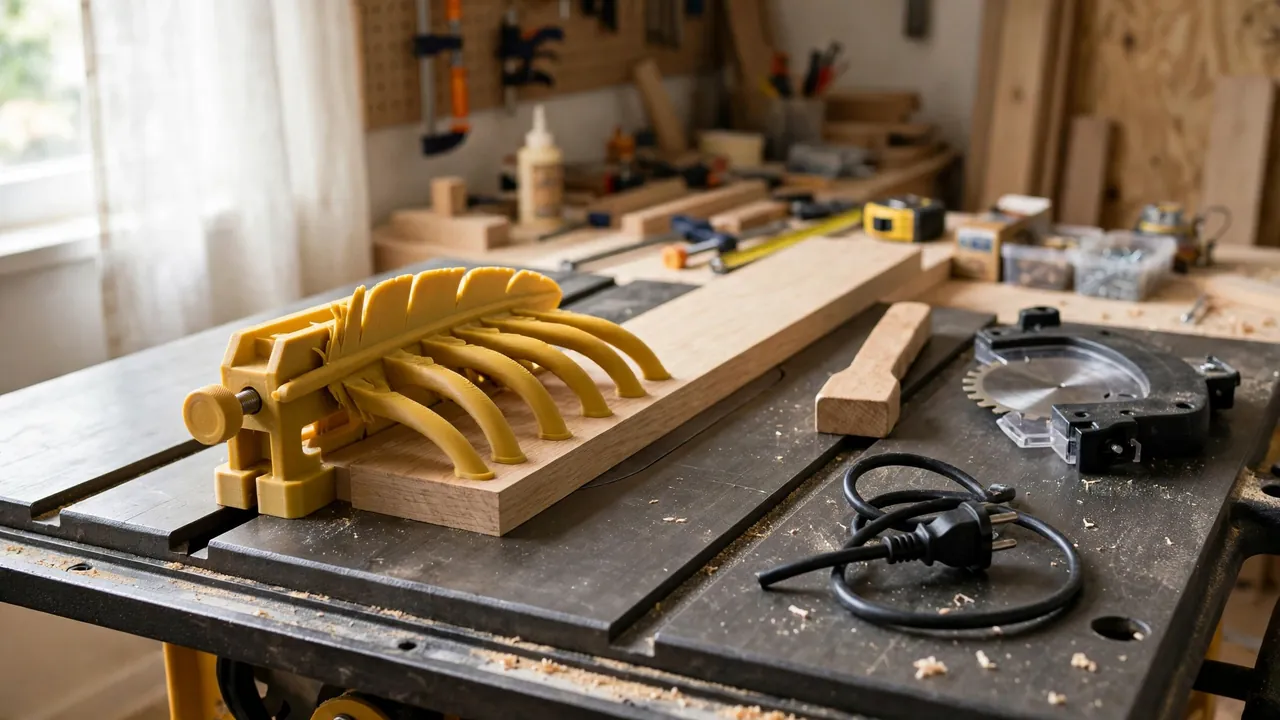
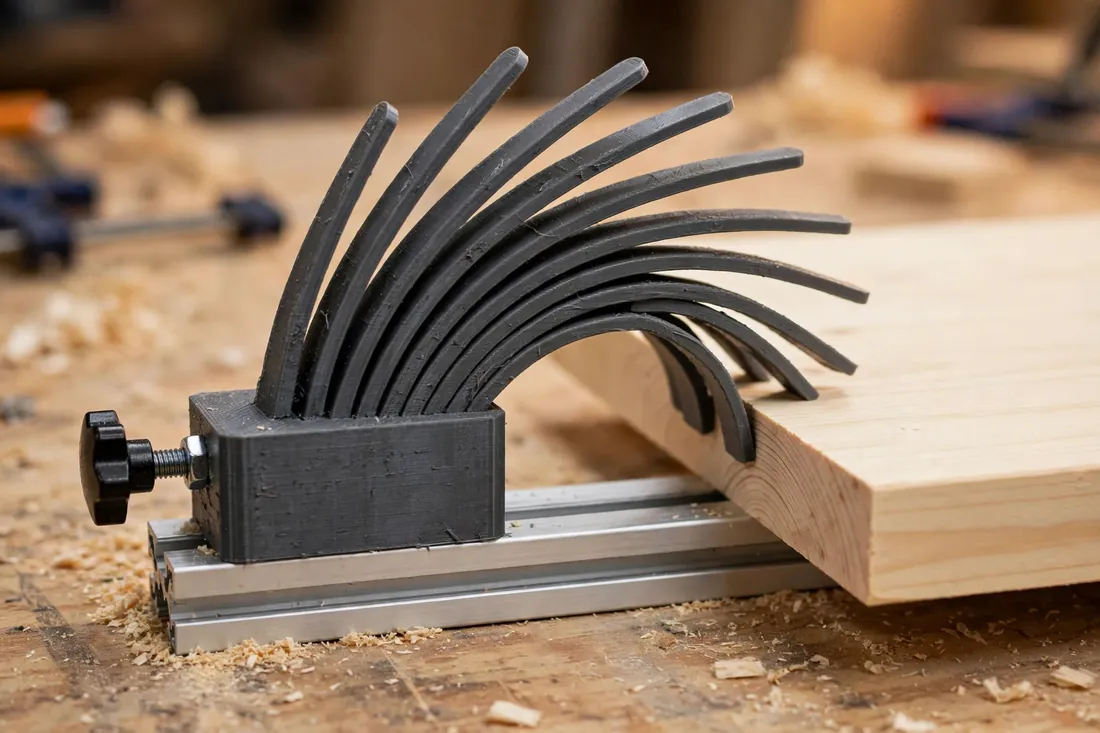
A featherboard helps with that consistency. It is a simple work-holding accessory: a base that locks to your table or fence, and a row of thin, angled fingers that flex against the workpiece edge, pressing the stock toward the fence as it feeds. Their angle lets the board slide forward more easily than it can slip back.
A 3D printed version lets you own one in the size your saw or router table needs. This guide covers an original design you model yourself — finger geometry, mounting for a miter slot or a router-table fence, and how to set sensible pressure.
Be clear about what it is, though: an accessory that helps feed consistency — not a guard, and never a replacement for one. Keep all factory guards in place, follow your saw maker’s instructions, and treat a printed version as a light- to moderate-pressure tool.
What You Need
The featherboard is one printed body plus ordinary hardware you may already have. No specialty parts are required.
Materials and tools
- A home 3D printer with a build area of at least 160 mm in one direction
- PETG filament — flexibility matters here, as explained below
- A table saw with a standard miter slot, or a router table with a fence you can clamp to
- Standard hardware to suit your mounting: an M8 or 5/16 inch bolt, a matching star knob or wing knob, a washer, and a nut or miter-slot bar
- A short length of wood for a sliding miter bar if your slot size calls for one, plus screws to suit
- A tape measure or calipers to measure your miter slot and fence
- A push stick, plus eye and hearing protection
Measure your own machine before designing; miter slots vary between saws.
Suggested print settings
- Layer height: 0.20 mm balances print time and finger smoothness.
- Walls: At least 4 perimeters — the finger roots and mounting body need the strength.
- Infill: 40 to 60 percent in the solid base section, grid or gyroid.
- Top and bottom layers: 4 or more, so the base stays flat on the table.
- Orientation: Print flat, fingers in the plane of the build plate, so layer lines run along each finger rather than across it.
- Supports: A flat design with a sloped finger profile needs none.
Print orientation matters: fingers flex in the plane they were printed in, and layer lines across a finger create a breaking point. Flat is stronger here.
Design Considerations
Model it in any basic CAD program: a flat body with angled fingers at one end, a solid mounting section at the other, and a slot for hardware between them.
1. Finger geometry and flex
Each finger is a thin tongue, typically 3 to 4 mm thick in the flexing direction, angled about 30 to 45 degrees toward the direction of feed. As the workpiece slides in, the fingers bend slightly and press back against its edge, permitting forward motion while resisting drift away from the fence.
Fingers around 50 to 70 mm long flex smoothly and forgive small variations in board width. Very short fingers feel harsh and chatter; very long, thin ones fold and apply almost no pressure. Round each finger’s root — a small fillet where it meets the body spreads stress and reduces the chance of snapping. Space fingers about 2 to 3 mm apart so each flexes on its own.
2. Why PETG suits this part
A featherboard lives by flexing repeatedly without cracking, and that points to PETG. It bends instead of snapping and tolerates workshop temperatures. PLA can work for a gentle first version, but it is more brittle at the finger roots and softens in a hot garage.
Either way, design generously: thicker roots, smooth curves, no sharp corners. The goal is a finger that springs, not one that strains.
3. Mounting in a miter slot
The classic setup anchors the featherboard in the miter slot parallel to the blade. Two approaches work with standard hardware:
- Miter bar: A bar sized to slide snugly in your slot, with a threaded hole or captured nut that the body bolts into.
- Expanding bolt arrangement: A bolt and shaped nut that wedges gently in the slot when tightened with a star knob.
Build in an adjustment slot, about 60 to 80 mm long, in the solid body. It lets you slide the featherboard toward or away from the fence for different stock widths and to set pressure without repositioning the bar. Test the fit in your actual slot and adjust by a few tenths of a millimeter until it slides freely without rocking.
4. Clamping to a router-table fence
On a router table, a featherboard is usually clamped or bolted to the fence to hold stock against the table or fence. For a printed version, clamping is simplest: give the body a flat, wide clamping face at least 25 mm deep, and use two small clamps or the fence’s accessory bolts if it has a track.
Check that clamps sit clear of the workpiece path and fingers reach the stock without crowding the cutter area. If a clamp would sit near the cutting zone, reposition instead of reaching.
5. Sizing and stock capacity
A body around 150 to 180 mm long with 12 to 16 fingers covers most small-workshop ripping and routing. Keep the finger row straight and the body rigid so fingers contact the edge squarely.
Step-by-Step: Printing and Assembly
- Measure your machine — miter slot width and depth, or your router-table fence height and clamping space.
- Model the body with the finger row at one end, a solid mounting section, and an adjustment slot between them.
- Print in PETG, flat on the bed, using the settings above.
- Clean up carefully. Remove stringing between fingers with a craft knife, working away from your hand, and check each finger flexes smoothly.
- Flex-test every finger by hand. Each should bend and spring back with even resistance; reprint if any finger is cracked, partly detached, or noticeably weaker.
- Fit the mounting hardware. Assemble the miter bar or clamping face, add the bolt, washer, and star knob, and confirm tightening does not distort the body.
- Do a dry setup with the machine switched off and unplugged, sliding a board through by hand to feel the pressure before any cut.
Step-by-Step: Setting Up and Using the Featherboard
- Start switched off. Fit guards as the maker directs, and set up the featherboard with the machine unplugged.
- Position the fingers before the cutter. Finger tips should contact the workpiece just ahead of the blade or cutter — never beside or behind it, where pressure could pinch the stock.
- Set light pressure first. Slide the featherboard in until the fingers just flex — about 2 to 3 mm of deflection — and lock the knob. Push the board through by hand and feel for steady, even resistance.
- Add pressure gradually only if the board still drifts in a hand-fed test. Firm is enough; fingers bent hard over make feeding difficult and strain the print.
- Confirm your feed plan. You should be able to feed the full length, using a push stick for the final portion and standing out of line with the blade, without your hands passing over the cutting area. If the plan requires reaching over a blade, stop and rethink the setup.
- Make a test cut in scrap of the same thickness and check the edge for straightness and consistency.
- Feed steadily, keeping stock against the fence, using the push stick as the end approaches, and letting the featherboard hold side pressure.
- Inspect after the first uses. Retire or reprint the part if you see whitening or cracks at finger roots.
Tips for Better Results
- Set pressure with the actual stock, not a thinner offcut — finger contact changes with thickness and edge shape.
- Keep fingers clean. Resin and dust build-up makes fingers grip unevenly; brush them off between jobs.
- Mark your usual settings with a pencil line on the body for common stock widths.
- Store it flat and unclamped, fingers unloaded, so they keep their natural spring.
Common Mistakes to Avoid
- Printing fingers across the layer lines. Fingers that flex across layers can snap. Print flat, as described.
- Cranking down maximum pressure. Excess flex makes feeding hard, marks soft stock, and fatigues the print. Light and even is the goal.
- Positioning fingers beside the blade. Pressure at the cut can pinch the workpiece. Contact belongs ahead of the cutter.
- Removing a factory guard to fit the featherboard. If the two cannot coexist on your machine, the featherboard does not get used there. Guards stay on.
- Using it on heavy, thick stock. It suits light to moderate feed pressure. Forcing it through heavy ripping is misuse.
Care, Storage, and When to Choose an Alternative
Brush off dust, check finger roots before use, and store it flat or hung by its slot, away from heat and sunlight. Any cracked or whitened finger is a reason to reprint — the part is inexpensive.
Be straightforward about limits. Choose a commercial featherboard for heavy stock, production runs, thick hardwood ripping, or any job needing strong, sustained pressure — commercial units are built for that work in a way a home print honestly is not. For thinner stock, sheet goods, and routine router-table work at modest pressure, a printed version made to fit your machine is genuinely useful.

FAQ
Is a 3D printed featherboard strong enough to be useful?
Yes, within its honest limits. In PETG with well-designed fingers, it provides light to moderate side pressure that steadies thinner stock and sheet material. It is not the tool for heavy hardwood ripping — choose a commercial unit there.
Does a featherboard replace the blade guard or a push stick?
No, never. A featherboard is a work-holding accessory only. Keep all factory guards in place and fitted as the maker directs, follow your saw’s instructions, and use a push stick for feeding — especially as the end of the board approaches the blade.
Can I use the same featherboard on my table saw and router table?
Often, yes, if you design for both: a miter-slot bar for the saw and a flat clamping face for the router-table fence. Check reach, clamp clearance, and finger position on each machine separately.
How much should the fingers bend when I set it up?
Start with about 2 to 3 mm of flex, tested by feeding the board by hand with the machine off. You want steady resistance and no drift. If the board needs a hard push, back the pressure off — more bend is not better.
Conclusion
A featherboard earns its keep quietly: straighter edges, more consistent cuts, and less wrestling with boards that want to wander. Printing your own lets you match finger size, body length, and mounting to your saw and router table.
Make the first one in PETG, set it up with the machine off, start with light pressure, and judge it on a test cut in scrap.
For the cutting itself, you may also enjoy our related guide, “3D Printed Miter Cutting Guide for Trim, Molding and Small Stock,” which pairs naturally with this featherboard for tidy, accurate work on smaller pieces.