Introduction
The most useful place for a motion light is often a corner — and a corner is the worst place to mount one. A flat-backed light screwed to one wall aims along that wall, leaving the other side in darkness. Swivel heads help a little, but the sensor still faces the wrong way for half the area you actually walk through.
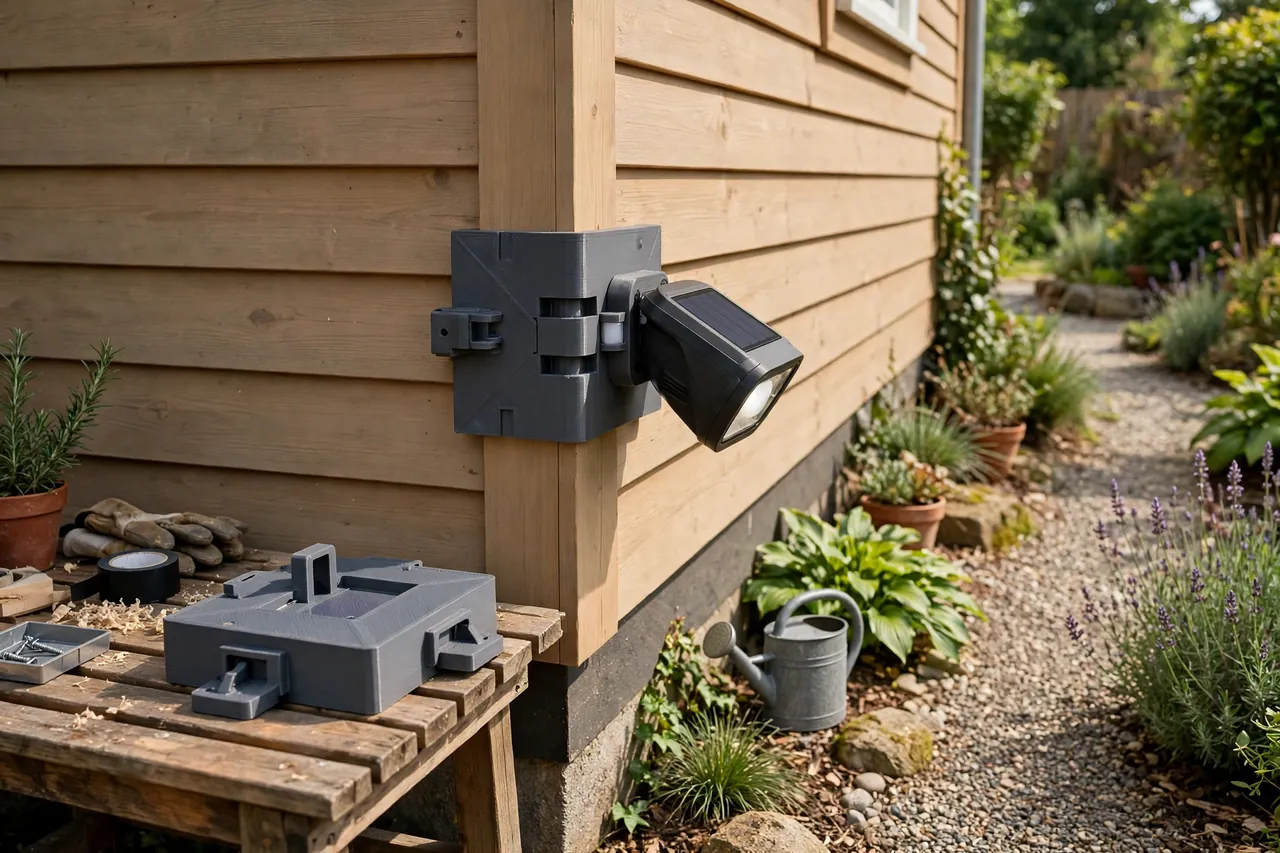
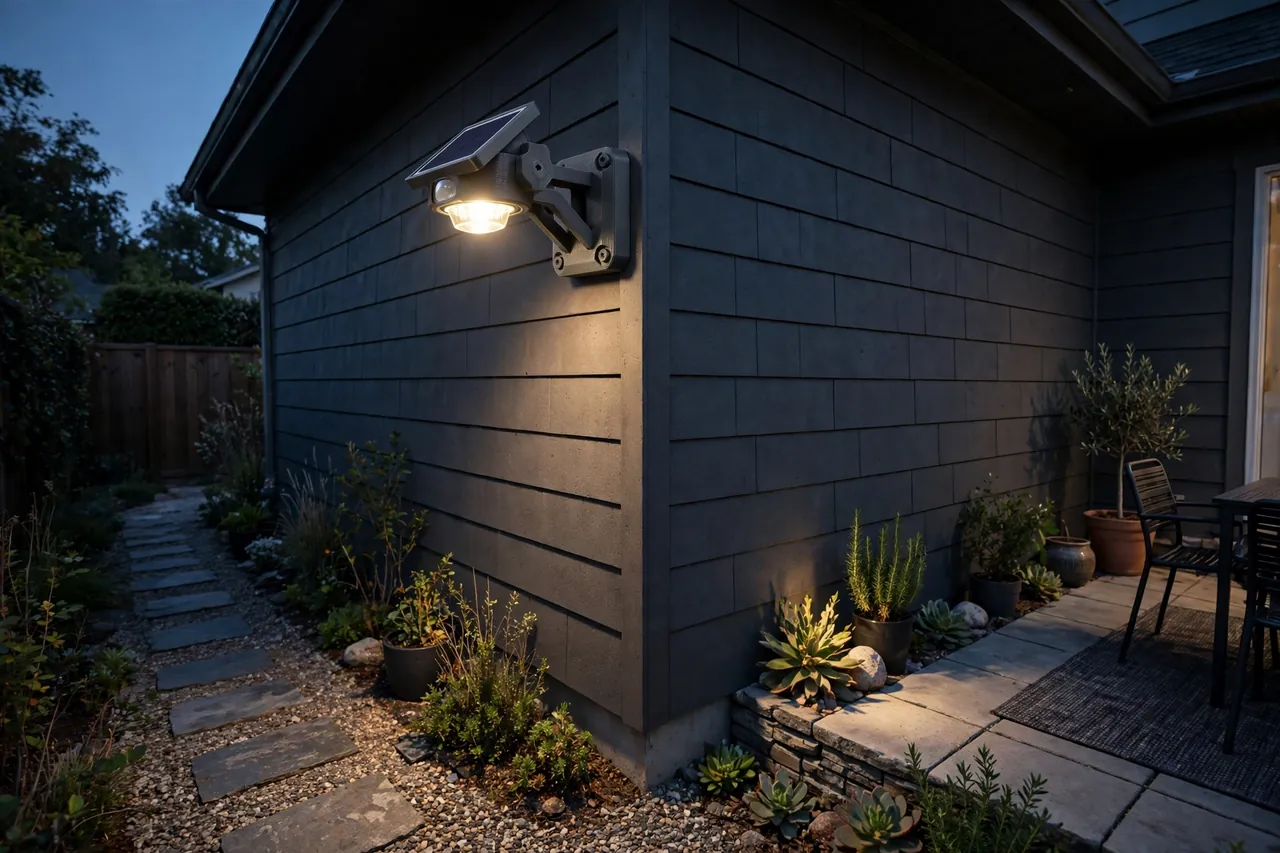
A 3D printed corner mount takes a simpler route. It is a bracket that wraps the building corner at 90 degrees, presents a flat, angled face to the light, and lets you fix the bracket to one wall — or strap it — while the light sits at the corner aimed diagonally across both approaches. One light, one corner, full coverage.
This guide covers designing, printing, and fitting that mount. The honest framing matters here: the printed part is only a mount for a sealed, finished solar light you already own. You never open the light, modify it, or touch its wiring — the light clips or screws to the bracket exactly as its maker intended, and all of its electrics stay sealed inside its own housing.
What You Need
The mount is a medium-sized print, roughly the footprint of the light it carries, and it lives outdoors, so material choice matters.
Materials and tools
- A home 3D printer with a build area of roughly 150 mm in at least one direction
- PETG filament — essential for outdoor use, as explained below
- The actual solar motion light you plan to mount, for measuring its back and fixing points
- Stainless screws suitable for your wall, plus wall plugs matched to the surface
- A tape measure or calipers, a spirit level, and a pencil
- A drill and driver for the bracket fixings only
- Outdoor-rated cable ties or a strap, optional, for a no-screw trial fit
- A step ladder for safe fitting at height
PETG is the default for anything that lives outside. It resists rain, tolerates summer heat on a sunlit wall without softening the way PLA can, and flexes rather than cracking when you snug screws down. Print the keeper in PETG even if you prototype in PLA. If your printer handles ASA, it is even more sun-resistant, but PETG serves most homes well for years.
Suggested print settings
- Layer height: 0.20 mm balances strength and print time for a bracket this size.
- Walls: At least 4 to 5 perimeters — the fixing flanges and corner wrap do the real work.
- Infill: 40 to 60 percent, grid or gyroid, for a mount that will not flex in wind.
- Top and bottom layers: 4 or more, so rain sheds off closed surfaces instead of finding layer gaps.
- Orientation: Print with the corner wrap vertical and the light face up if the design allows, keeping layer lines across the load, not along it.
- Supports: Design the wrap with flat inner faces so supports are minimal or unnecessary.
Print a test version first, even in PLA, and hold it on the actual corner before committing to the full-strength print.
Design Considerations
You can model this mount in any basic CAD program. It is essentially two wall flanges joined at a right angle, with an angled mounting face bridging them.
1. Match the mount to your corner
Outside corners are nominally 90 degrees, but render, cladding, and stone all wander. Measure your corner with a large square or two straight edges before modelling. Design the wrap to sit against both faces with a small gap — about 1 to 2 mm — at the very point of the corner, so the bracket seats on the flat faces rather than rocking on the point. Add a slight relief channel down the inside of the corner for the same reason. Brick and rendered corners also have texture; flat, generous flanges spread the fixing load better than narrow ones.
2. Present the light at a useful angle
The whole point is the angle. A mounting face set at 45 degrees across the corner aims the light and its sensor diagonally, covering both walls’ approaches with one unit. Before printing, stand where you walk at night and decide the tilt the light needs: most motion lights want to sit roughly 2 to 2.5 metres up, tilted down slightly so the sensor watches the path, not the sky. If your light has its own adjustable head, keep the printed face vertical and let the light do the tilting — simpler and more adaptable.
3. Copy the light’s own mounting pattern
Measure the light’s back carefully: its screw holes, keyhole slots, or clip plate. Reproduce that pattern exactly on the mount’s face, with about 0.3 to 0.5 mm of clearance on any clip features so the light slides on as its maker intended. The light must attach to your bracket using its own standard fixings, untouched. Never drill new holes in the light’s housing, never open its case, and never extend or reroute its cable — a sealed solar light stays sealed, and the bracket simply gives it a better place to sit.
Step-by-Step: Printing and Assembly
- Measure the corner and the light’s back, including its fixing pattern, with calipers.
- Model the wrap and angled face, with flanges, fixing slots, and the light’s mounting pattern copied exactly.
- Print a test fit in any filament and hold it on the corner; check it seats on both faces without rocking.
- Test-fit the light onto the printed face using its own clips or screws, and confirm it sits square.
- Adjust once. Open tight clip features by 0.2 mm, or shift a flange if the corner sits unevenly.
- Print the keeper in PETG with the settings above.
- Clean up the print. Clear stringing from the fixing slots and lightly sand any high spots on the inner faces.
- Pre-fit the light on the bench, fully assembled, so the ladder work later is just fixing the bracket.
Step-by-Step: Using the Corner Mount
- Choose the exact corner and height, standing on the path at dusk if you can, to judge where light and sensor coverage matter.
- Hold the mount in place and mark the flange fixings through the slots with a pencil.
- Check for anything hidden in the wall at those marks before drilling — if you are in any doubt about what is inside the wall, choose different fixing points.
- Drill and plug the flange holes in the flat wall faces, well away from the corner point.
- Screw the bracket up snugly, checking it has not twisted as the screws tighten.
- Attach the sealed light to the bracket using its own standard fixings, exactly as its instructions describe.
- Set the light’s own controls — sensitivity, duration, and mode — following its manual.
- Walk-test at night. Approach from both directions and confirm the sensor sees you and the light covers the turn of the path.
Tips for Better Results
- Trial with straps first. A weekend on cable ties tells you if the position is right before any holes are drilled.
- Aim the solar panel at the sky, not the wall. If the light’s panel is fixed to its body, rotate the whole unit within the mount’s slots so the panel gets midday sun.
- Seal the top edge with a small bead of outdoor sealant where the flange meets the wall if wind-driven rain gets behind brackets at your home.
- Use stainless fixings. Ordinary screws rust-stain walls and seize within a season or two.
Common Mistakes to Avoid
- Drilling into the corner point. Fixings there crack render and hold badly. The design exists to avoid exactly that.
- Printing the outdoor keeper in PLA. Sun and heat will warp it; PETG is the minimum for this job.
- Modifying the light to fit the mount. If the light does not fit, change the printed mount — the sealed light is never the thing to alter.
- Mounting too low. A sensor at head height triggers on every passer-by on the pavement and lights the street instead of your path.
Care, Storage, and When to Choose an Alternative
Wipe the light’s panel and sensor lens clean a few times a year, following its maker’s guidance, and check the bracket each spring for cracks around the fixing slots. Retighten straps on strap-fixed mounts seasonally. A sound PETG bracket should serve for years; any single damaged one reprints overnight.
Sometimes a manufactured metal corner bracket is the better choice: very heavy lights, extremely exposed coastal corners, or commercial settings where a rated fixing is required. For the typical home solar motion light — light, sealed, and modest in size — a well-printed PETG mount is strong, neat, and far kinder to your walls.
FAQ
Do I need to open the light or change its wiring to use this mount?
No — never. The mount is only a bracket. Your solar light stays a sealed, finished product: it attaches to the printed face with its own screws or clip plate, and its panel, battery, and wiring all stay inside its housing, untouched.
Will one light on a corner really cover both approaches?
In most homes, yes. Set at 45 degrees across the corner, the sensor watches both walls’ approaches and the light covers the turn where paths meet.
Can I fit this without drilling at all?
Often, yes, for a trial or a rental. Wide flanges with strap slots let you lash the mount to a corner post, downpipe, or fence upright.
How long will a PETG mount last outdoors?
Several years in typical conditions. Sun slowly ages any plastic, so inspect annually for whitening or fine cracks around screw holes.
Conclusion
Corners stop being a mounting problem once the bracket does the geometry for you. A printed wrap, an angled face, and fixings placed in flat wall turn one sealed solar light into proper coverage for the turn of a path — without a single hole in the corner itself.
Print a test, walk-test the position at night, and then commit to the PETG keeper. If you are lighting more of the garden’s edges, you may also enjoy our related guide, “Solar Light Wall Mounts: 3D Print Brackets for Patios, Fences and Pathways,” which covers the flat-wall version of this same idea.
For repairing the lights you already own before remounting them, our guide “3D Printed Brackets for Solar Garden Lights: Repair Broken Stakes and Mounts the DIY Way” is a natural companion, and if a workshop corner needs the same treatment, “Solar Work Light Mount: 3D Print a Holder for Your Sealed Solar Workshop Light” applies the same sealed-light, printed-holder thinking indoors.