Introduction
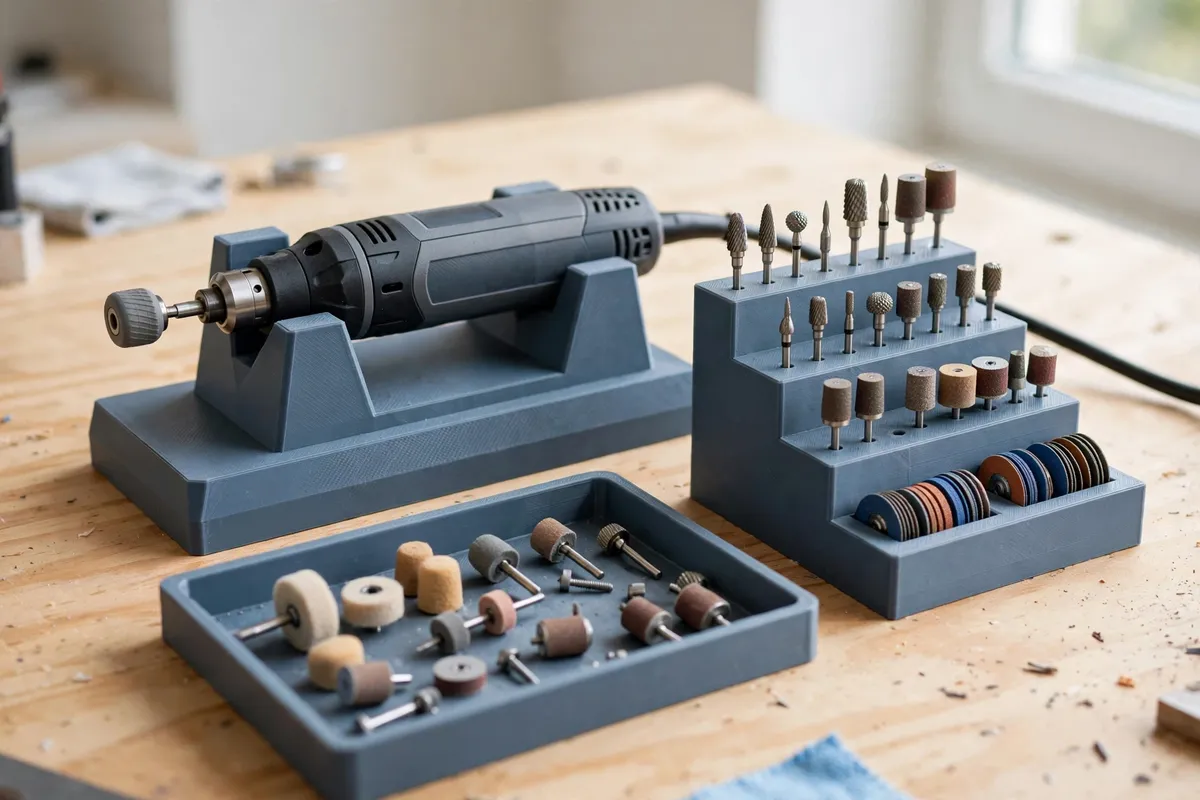
The rotary tool is the workshop’s most versatile small instrument — and its accessories are the workshop’s most chaotic. Bits live in a jumbled tin, collets hide in the bottom of a drawer, and the tool itself rolls around the bench between cuts, cord trailing. A printed station ends all of it: the tool rests in a cradle, every bit stands in a labeled hole, and the collets sit in a cup where you can actually find them.
This is a storage and resting station only. It holds the tool while it is off and at rest, and organizes its accessories; it does not attach to the tool while it runs, guide it, or form part of any machining setup. The tool keeps doing its work in your hand, exactly as its maker intended — the station is simply where everything lives between jobs.
This guide covers designing one integrated station: cradle, bit block, collet cup, and accessory tray, sized to your tool and your bit collection.
What You Need
Rotary tools share a general shape but differ in body diameter and nose length, so measure yours before modeling. Bits, happily, are nearly universal.
Materials and tools
- A home 3D printer with a build area of roughly 200 mm for a one-piece station, or design it in two interlocking halves
- PLA is ideal for crisp holes and indoor bench use; PETG if your bench is in a hot garage
- Your rotary tool, off and unplugged, for measuring body diameter and length
- Your full bit and accessory collection, gathered from every tin and drawer it hides in
- Calipers for bit shank diameters and the tool body
- A pencil and paper to plan the bit layout by type
Suggested print settings
- Layer height: 0.2 mm — the bit holes print cleanly and the part stays quick.
- Walls: 3 to 4 perimeters.
- Infill: 20 to 30 percent, grid or gyroid.
- Top and bottom layers: 4 or more around the bit block so holes have clean rims.
- Orientation: Print flat on the bed, bit holes vertical.
- Supports: Shape the cradle as an open saddle and the whole station prints without them.
Design Considerations
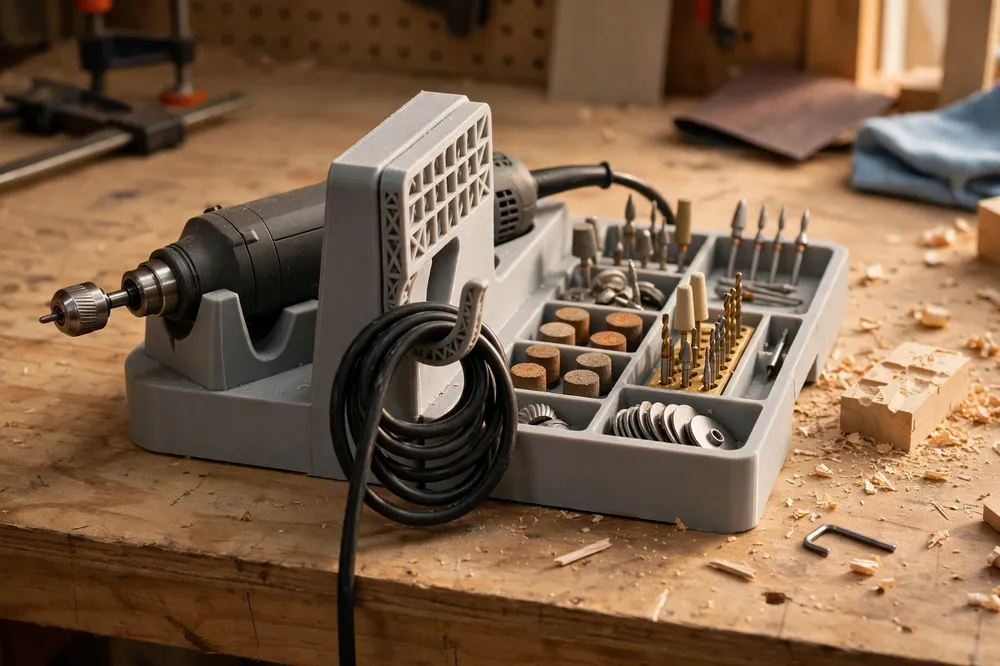
Think of the station as a small benchtop landscape: cradle at the back, bit block in the middle, tray at the front, everything within one hand’s reach.
1. The cradle: a rest, sized to your tool
Model the cradle as a shallow saddle or two low rails that the tool’s body settles into horizontally, nose pointing forward over the tray. Measure your tool’s body diameter at its widest and give the saddle a couple of millimeters of clearance, with the contact points on the tool’s casing flats where it naturally rests. Raise the tool just enough — 30 to 45 mm — that its cord drops off the back of the station without levering it, and add a cord hook or notch on one side for the loop of spare cable.
A small raised lip at the saddle’s low point stops the tool rolling forward when the bench gets bumped. That is the cradle’s entire job: a safe, repeatable parking place for a tool that is switched off.
2. The bit block: holes by shank, sorted by job
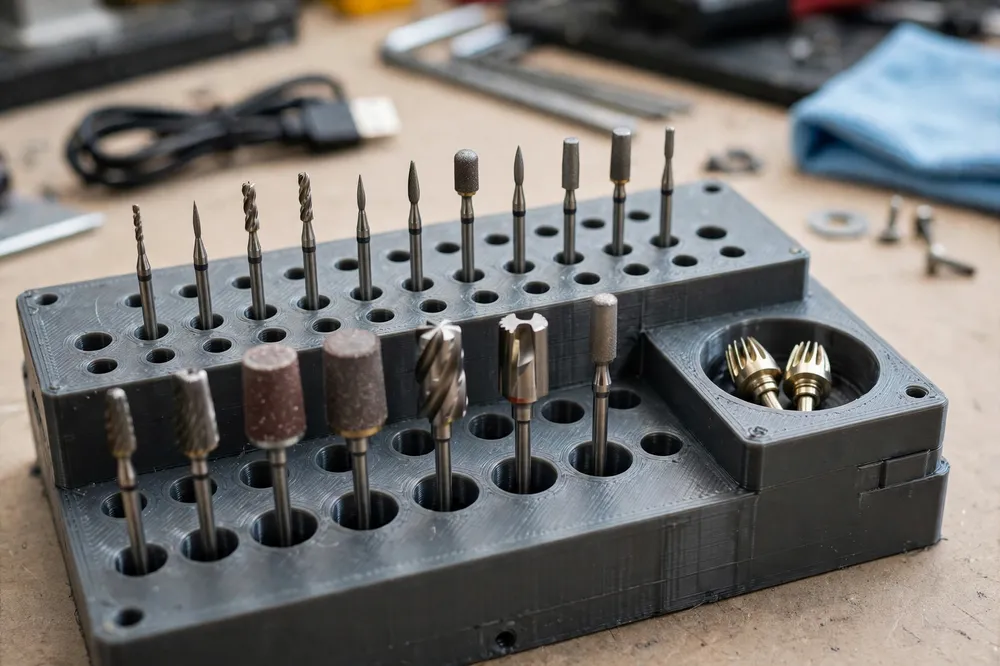
Almost every rotary accessory uses a 3.2 mm (1/8 inch) shank, with a smaller family at 2.35 mm. Model the hole grid at 3.4 mm and 2.6 mm respectively, deep enough — 18 to 22 mm — that bits stand upright without wobbling, spaced about 12 mm apart so fingers can grip one bit without disturbing its neighbors.
Arrange by job, not by size: a row for cutting discs and saws, a row for sanding drums and bands, a row for burrs and carving bits, a row for polishing and wire work. Emboss a tiny icon or letter at each row’s end, or leave a label flat on the front edge. A stepped layout — rear rows a shelf higher than front rows — makes every bit visible at a glance and is the single design choice users praise most.
3. Collets and small parts get a cup, not a hole
Collets, collet nuts, wrenches, and spare mandrels are the pieces that vanish. Give them a shallow recessed cup — 40 to 50 mm across, 12 mm deep — modeled into the station beside the cradle, plus two or three short posts that spare collets drop onto so they stand visibly instead of rattling loose. The little wrench that came with the tool earns a flat slot it slides into edge-first. If a small part has a printed home, it comes back to that home; that is the entire secret of workshop organization.
4. The accessory tray and a footprint that stays put
Across the front, a shallow tray — 8 to 10 mm deep with a low lip — catches the parts in play during a job: the bits you have swapped out, the workpiece’s small screws, the sanding bands waiting their turn. Under the station, add recesses for rubber feet or a non-slip mat; a station that slides when you grab the tool is worse than no station. Total footprint around 220 by 140 mm suits most benches and leaves the station light enough to move to the work.
Step-by-Step: Printing and Setting Up the Station
- Gather and sort every bit you own into job groups, and count them. The block is sized by the collection, not by hope.
- Measure your tool’s body diameter and resting length, and sketch the layout: cradle back, bit block middle, tray front, cup at the side.
- Model the station, with hole sizes at 3.4 mm and 2.6 mm, stepped rows, the collet cup, posts, and wrench slot.
- Test print the bit block corner first — a small patch of holes — and check your real bits drop in and lift out cleanly. Adjust hole size in the model for your printer’s habits.
- Print the full station flat, let it cool, and clear any stringing from the holes with the shank of a spare bit.
- Fit rubber feet if you modeled recesses, set the station in its bench spot, and park the tool in the cradle.
- Load the bits by row, collets on their posts, wrench in its slot. Photograph the loaded station — the photo is your reset guide after big jobs.
Tips for Better Results
- Print the test patch of holes. Hole fit varies by printer and filament; ten minutes of testing beats a station of slightly wrong holes.
- Leave a few spare holes per row. Collections grow; a block that is full on day one is a problem by month two.
- Keep cutting discs in a separate shallow slot stack, standing on edge like records — flat stacking cracks brittle discs.
- Park the tool nose-forward over the tray, so a dropped bit or screw lands in the tray, not under the bench.
- Reset the station after every job. Sixty seconds of putting bits home is what keeps the system a system.
Common Mistakes to Avoid
- Holes sized exactly at the nominal shank diameter. Printers close holes slightly; 3.4 mm holes for 3.2 mm shanks is the difference between easy and stuck.
- A cradle that grips the tool. The tool should lift out straight up with one hand. If it needs wiggling free, the saddle is too tight — and someday it will be pulled free while switched on. Clearance, always.
- All bits in one undifferentiated grid. Organization by job is what saves time; a sorted-by-nothing block is just a tidier junk tin.
- No home for collets. They are small, essential, and unmatched at hiding. The cup and posts are the heart of this design.
- A station too light for its cord. If the trailing cord can drag the station, widen the base, add feet, or route the cord through the rear notch every time.
Care, Storage, and When to Choose an Alternative
Blow dust out of the holes with a soft brush now and then — rotary work makes fine dust that packs into grids — and wipe the tray after messy jobs. If a hole wears loose over the years, that row’s insert can be reprinted if you modeled the block as a separate piece; if not, a drop of removable thread-lock on a problem bit’s storage spot is a field fix, but a reprint is cleaner.
Store rarely used specialty bits in a second small block behind the station rather than overcrowding the main one.
Choose an alternative when your rotary tool lives in a traveling kit — a lidded case with foam cutouts travels better than an open station — or when you use a flex-shaft setup full-time, where a hanging hook for the handpiece and a smaller block suit better. For a bench-based tool and a growing bit collection, the integrated station is the tidy answer.
FAQ
Will one station fit different rotary tool brands?
The bit block is universal — shanks are standardized at 3.2 mm and 2.35 mm — but the cradle should match your tool’s body diameter. The design is parametric in spirit: measure your tool, set the saddle width and clearance, and the rest of the station stays the same.
How many bits should the block hold?
Count your collection and add a third again for growth. Most home users land between 40 and 70 holes in job rows. A block that starts two-thirds full stays useful for years; one that starts full gets outgrown in months.
Is PLA strong enough for a rotary tool station?
Yes. The station carries a light tool at rest and sees no impacts beyond bench bumps. PLA’s stiffness actually helps the bit holes stay crisp. Choose PETG only if the station will live somewhere hot, like a sun-facing garage bench.
Where do cutting discs and sanding bands go?
Cutting discs stand on edge in a row of shallow slots, like records in a rack, which protects their brittle edges. Sanding drums sit on posts or in the larger holes, and spare bands stack on the drum they fit, ready to swap. Both get their own row in the tray-end of the block.
Conclusion
A rotary tool earns its versatility from its accessories, and accessories only help when you can find them. One printed station — a safe cradle for the tool at rest, job-sorted holes for every bit, a cup that keeps collets honest, and a tray for the work in progress — turns the most chaotic corner of the bench into the most organized.
Measure your tool, count your bits, and print yourself a proper home base.
If you like giving small tools a proper station, you may also enjoy our related guide, “3D Printed Drill Bit and Driver Bit Organizer: A Workbench Storage System That Grows With You,” which brings the same sorted-by-job approach to the drill’s family of bits.