Introduction
Edge banding is the difference between a shelf that looks built and a shelf that looks homemade in the wrong way. The banding itself is easy — iron it or glue it on, slightly overhanging. The craft is in the trimming: that overhang must come off dead flush with the panel faces, without nicking the veneer, digging into the banding, or leaving a ridge your fingers find every time.
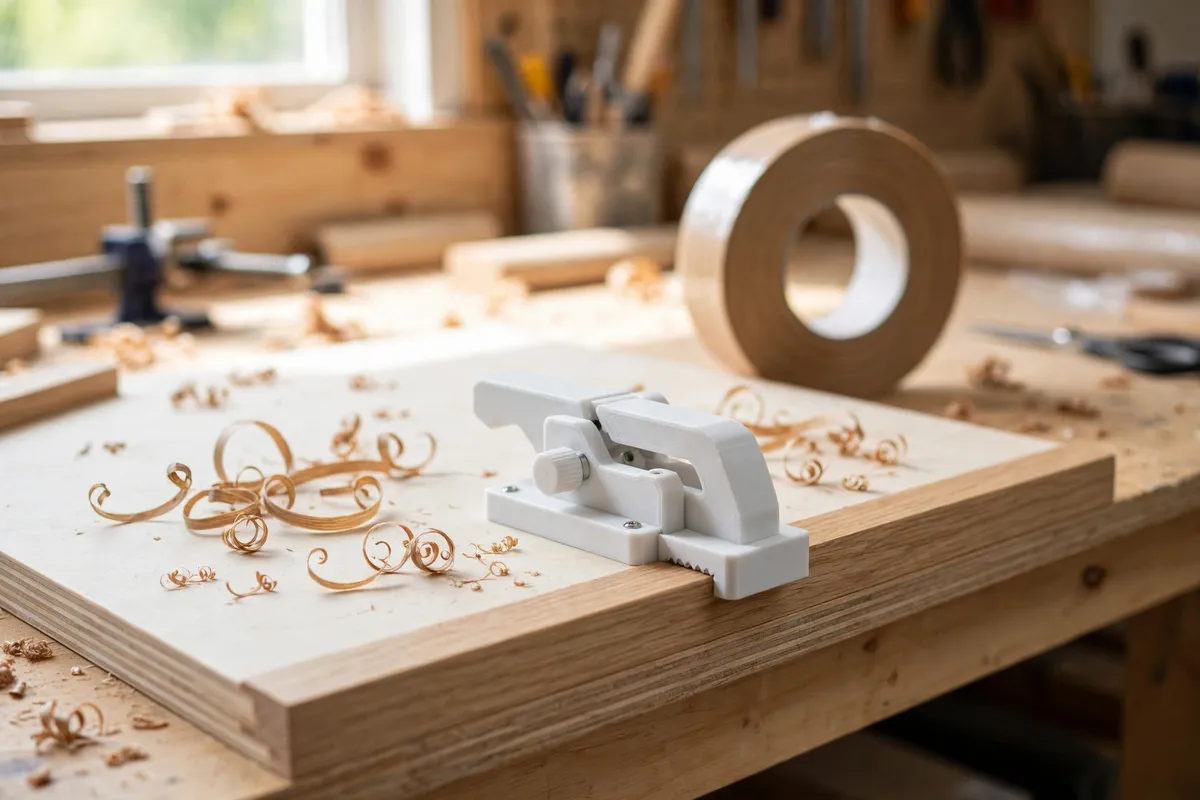
A printed trimmer guide makes the cut mechanical. It is a fence block that rides flat on the panel’s face with a standard utility blade seated at exactly the right height and a slight cutting angle, so you draw the guide along the edge and the blade shears the overhang flush in one calm pass. The guide, not your hand, decides where the blade runs — which is why the results look like a machine did them.
This guide covers designing the fence and blade seat, setting the blade so it cuts flush and never deeper, and trimming techniques for long grain, end grain, and corners.
What You Need
The guide is a small print, but its accuracy lives in one relationship: the blade edge must sit exactly in line with the fence’s reference face. Measure and test accordingly.
Materials and tools
- A home 3D printer — this is a palm-sized part
- PLA for maximum stiffness and crisp edges; PETG is acceptable but slightly more flexible
- Standard utility knife blades — the trapezoidal kind — which the blade seat is sized around; use new, sharp blades only
- Your shelf panels with banding already applied and the glue fully cured
- Offcut panels with banding for test trims — do not learn on the real shelves
- Calipers for checking blade seat depth
- A file or fine sandpaper for the final tune of the fence face
Suggested print settings
- Layer height: 0.12 to 0.2 mm — fine layers keep the reference face smooth and true.
- Walls: 5 perimeters or print effectively solid; stiffness is the whole product.
- Infill: 60 to 100 percent. This small part should feel like a block, not a shell.
- Top and bottom layers: Solid throughout at these settings is fine.
- Orientation: Print with the reference face down on a smooth bed so that face comes out perfectly flat.
- Supports: Design the blade slot to print open without internal overhangs beyond what a short bridge handles.
Design Considerations
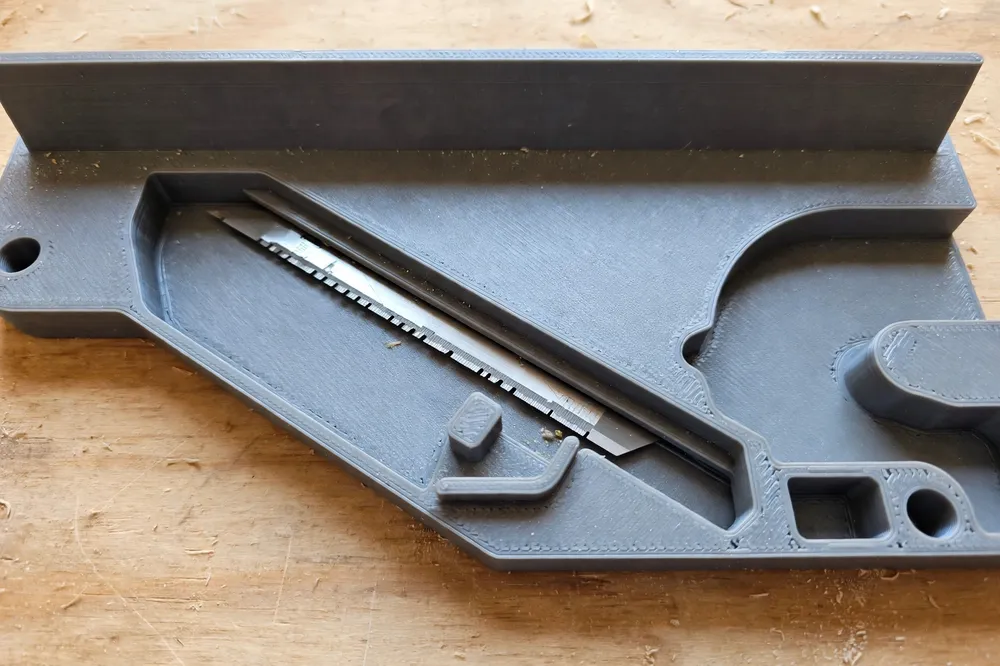
Model the guide as a block about 90 to 110 mm long with three working features: the reference fence, the blade seat, and the hand grip.
1. The reference fence decides everything
The fence is the broad, flat face that slides against the panel’s surface. It must be genuinely flat and at least 40 to 50 mm wide across the panel face, so the guide cannot rock as it travels. The blade edge sits exactly in the plane of this fence — that is the entire mechanism. If the blade protrudes a tenth beyond the fence plane, it shaves the panel’s veneer; a tenth shy, and it leaves a lip of banding. Build the seat so the blade’s position can be tuned: a slot with a small range of seating depth, locked by the blade’s own notch and a snug fit, lets you dial in flush on a test panel and keep it.
Round the fence’s leading and trailing edges very slightly so it glides over tiny glue bumps instead of catching on them, but keep the working middle dead flat.
2. A slight blade angle for a shearing cut
A blade dragged square-on scrapes; a blade angled a few degrees slices. Seat the blade at roughly 5 to 10 degrees of skew to the direction of travel, so the edge shears the banding fibers as the guide moves. The cutting edge should also sit very slightly nose-down along the panel edge — the leading point of the edge meets the banding first, and the cut peels away behind it. Both angles are small; resist the urge to exaggerate them, which turns a trimmer into a gouge.
Importantly, the blade’s non-cutting end and spine must be fully housed in the printed slot. Only the working portion of the edge meets the banding; the rest of this store-bought blade lives inside the block, gripped firmly, impossible to slip.
3. Two faces for two jobs
Banding overhangs on two sides of the panel edge — the top face and the bottom face — and a well-designed guide trims both. The simplest approach: a fence geometry that works flipped, with a blade seat readable from either orientation, so the same guide trims the top pass, flips, and trims the bottom pass. Alternatively, add a second, narrower fence on the block’s top for end grain, where you trim across the panel’s end and the banding wants a shorter, more supported cut. Decide which you need; most shelf work is long edges, and a symmetrical flip design covers it.
4. A grip that keeps fingers behind the edge
Shape the top of the block into a comfortable palm swell or finger grooves that keep your hand entirely on top of the guide, pushing down and forward, with fingers nowhere near the blade’s path or the trimmed edge. A guide you hold tentatively cuts tentatively; a guide you hold confidently, well clear of the edge, glides.
Step-by-Step: Printing and Setting Up the Guide
- Model the block: fence face flat, blade slot at the slight skew, seat depth adjustable over a small range, housing the blade’s spine fully.
- Print it solid-feeling, reference face down, at fine layers, and let it cool fully before removal.
- Check the fence face on a known-flat surface. Any rock at all means a light pass over fine sandpaper on a flat board until it sits true.
- Seat a new blade and make a test trim on a banded offcut. Inspect the result with a fingertip and raking light.
- Tune the seat depth until the trim is dead flush — no lip, no veneer shaving — then make a note of the seating position. This setup step happens once per blade change, not once per shelf.
Step-by-Step: Trimming the Shelves
- Confirm the banding glue is fully cured. Trimming green glue tears fibers instead of slicing them.
- Rest the fence flat on the panel face, blade at the starting corner, overhang facing the blade.
- Draw the guide along the edge in one steady pass, moderate downward pressure, letting the skew slice. Long edges may take two passes — the second removes whispers.
- Flip the guide and trim the other face’s overhang the same way.
- Ease the sharp corner the two passes leave with two light strokes of fine sandpaper on a small block — a softened arris, not a rounded-over edge.
- Check by fingertip. A flush trim is one you cannot find by touch. Any ridge means a fraction more blade exposure; any catch of veneer means a fraction less.
Tips for Better Results
- Always trim a test offcut first after every blade change. Thirty seconds of testing protects every panel that follows.
- Trim with the banding’s grain on long edges wherever the wood gives you a choice; against-grain trimming invites small tears at the fibers.
- Brush glue squeeze-out off before trimming. Dried glue bumps deflect the fence and record themselves as waves in your trim line.
- Take two light passes over one heavy one, especially on thick or hardwood banding. The guide makes repeat passes land in exactly the same place.
- Swap blades early. A dulling blade starts to scrape and chatter long before it looks worn. Blades are cheap; veneer is not.
Common Mistakes to Avoid
- Blade exposure set by guesswork. “Looks about flush” shaves veneer or leaves lips. Test offcuts exist for exactly this dial-in.
- Rocking the guide. If the fence face is not flat, or you lift the back of the block as you push, the cut depth wanders. Flat fence, flat hold, steady travel.
- Trimming before the glue cures. Patience is a material property here. Soft glue smears and tears fibers that a cured joint would slice cleanly.
- Pressing harder to fix a bad cut. Pressure cannot correct seat depth; it only adds gouges. Stop, adjust the seat, test again.
- Fingers ahead of the block. The guide’s grip exists so your hand stays behind and above the edge. Use it that way every pass.
Care, Storage, and When to Choose an Alternative
Remove the blade before storing the guide — a housed blade still deserves respect in a drawer — and keep the guide with your banding supplies. Check the fence face for nicks each time you take it out; a nicked fence prints its mark on every trim until it is sanded flat or reprinted. At this size, a reprint is a perfectly reasonable repair.
Choose an alternative when you trim banding all day in a production setting, where a dedicated commercial trimmer or a router with a flush-trim setup earns its cost, or when your banding is thick solid-wood lipping, which wants a small block plane rather than a blade guide. For the home shelf and cabinet builder working in standard veneer and PVC banding, the printed guide turns the fiddliest step of the job into the most satisfying one.
FAQ
What blade does the guide use?
A standard trapezoidal utility blade — the kind sold everywhere in packs. The seat is modeled around its dimensions, with the spine and non-working end fully housed in the printed block. Use fresh, sharp blades and change them at the first sign of scraping instead of slicing.
Will the guide work on both faces of the panel?
Yes, if you model it that way: a symmetrical design flips over to trim the second face’s overhang with the same blade setting. Test both orientations on your offcut during setup, since the flip can reveal a hair of difference worth tuning out.
Can it trim end grain banding too?
It can, with a lighter touch. End grain fibers tear more easily, so take two or three shallow passes, support the exit corner of the panel with a sacrificial block so fibers do not blow out at the end of the cut, and make sure the blade is at its sharpest.
Why not just use a bare utility knife or a chisel?
Because freehand trimming puts depth control in your wrist, and wrists vary along a two-meter edge. The guide’s fence fixes the blade in the plane of the panel face for the whole pass. That single mechanical fact is the difference between edges that are flush where you concentrated and edges that are flush everywhere.
Conclusion
Flush banding is not a talent; it is a setup. A stiff printed block with a dead-flat fence and a properly seated blade makes the cut land in the plane of the panel, pass after pass, shelf after shelf — and turns the step most beginners dread into a quiet, shaving-curls victory.
Print it solid, tune it on an offcut, and let the fence do the thinking.
If you enjoy small guides that make cabinet work cleaner, you may also enjoy our related guide, “3D Printed Miter Cutting Guide for Trim, Molding and Small Stock,” which brings the same fence-and-repeatability thinking to accurate trim cuts.