Introduction
Adjustable shelves are only adjustable if the pin holes line up. Drill one row a few millimetres off from the row opposite it and every shelf rocks, tips, or sits at a visible slant — and a bookcase full of slightly crooked shelves never stops annoying you. The fix is not a steadier hand. The fix is a jig that makes every hole land in exactly the same relative position, row after row, panel after panel.
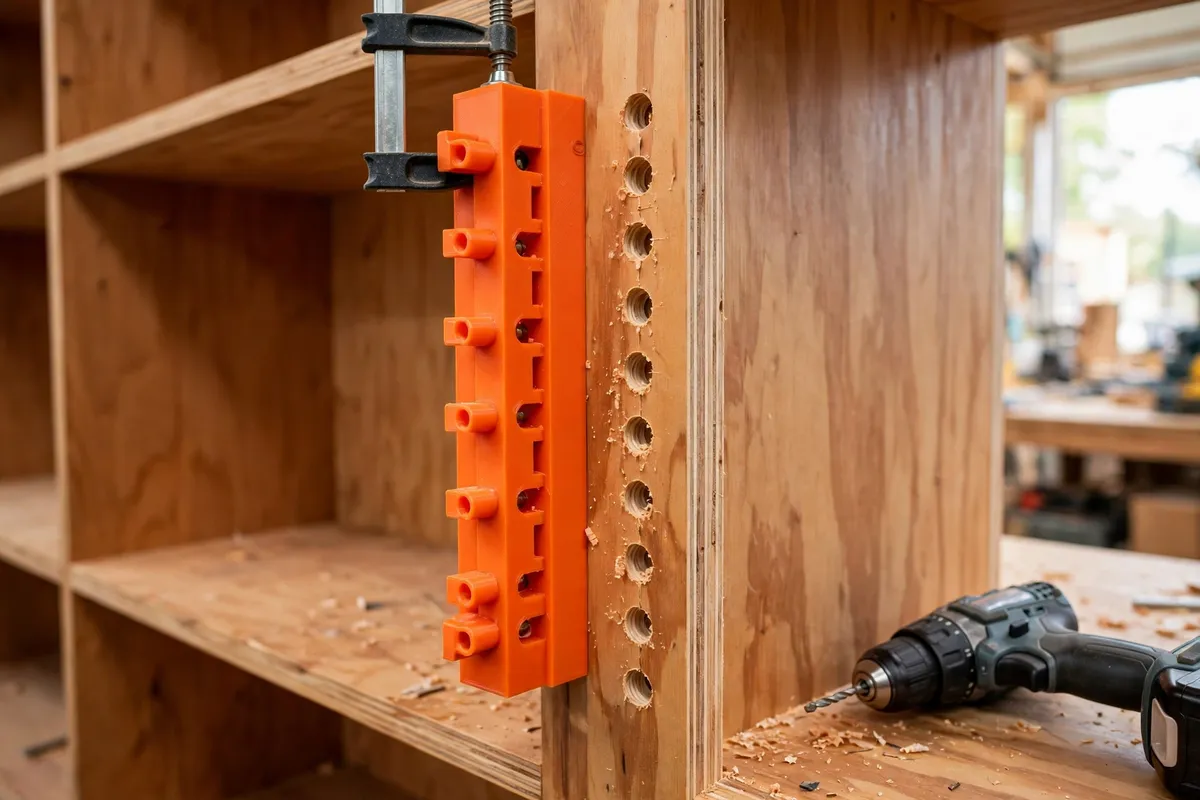
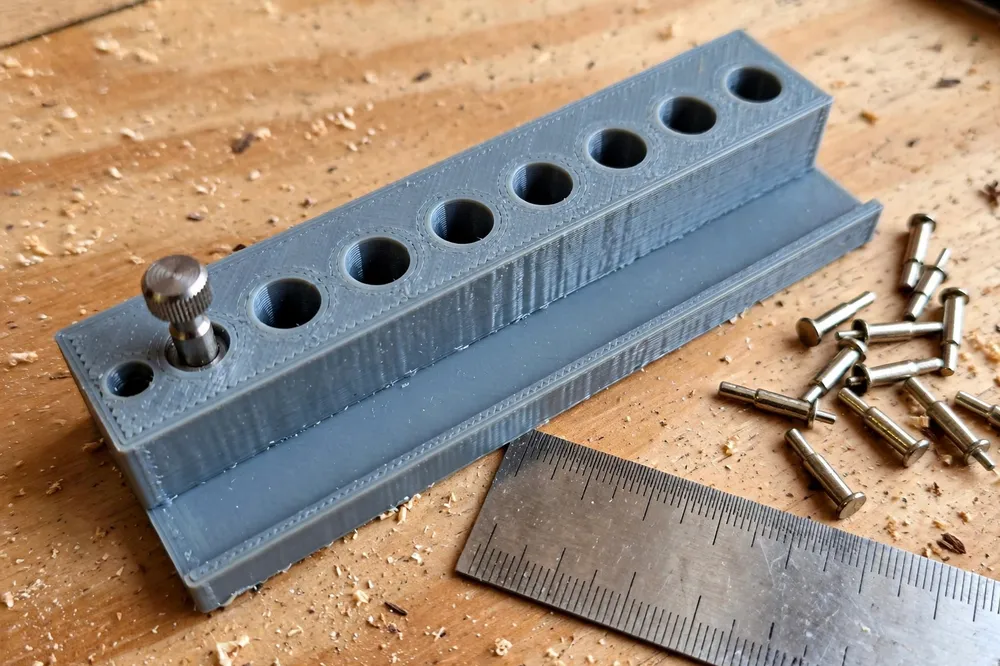
A 3D printed shelf pin jig does that job beautifully. It is a flat guide plate with holes at a fixed, even spacing, a fence that registers against the edge of the panel, and an indexing pin that drops into the last drilled hole so the jig steps up the panel in perfect increments. Because you model it yourself, you set the spacing, the hole size, and the setback from the panel edge to match the shelf pins you actually own.
This guide covers designing, printing, and using a shelf pin jig that produces two neat columns of holes per panel side, every shelf dead level, and no measuring between holes ever again.
What You Need
This is a precision jig, so accuracy in the print matters more than brute strength. Plan for a flat, well-calibrated print and a sharp brad-point bit.
Materials and tools
- A home 3D printer with a build area of roughly 200 mm or more in one direction
- PETG filament for a stable, slightly forgiving jig body (PLA works too and prints flattest)
- Shelf pins in your chosen size — 5 mm pins are the most common, 1/4 inch in some regions
- A cordless drill and a sharp brad-point bit that matches your pins exactly
- A clamp or two to hold the jig flat against the panel
- A tape measure, a pencil, and a combination square for the first setup marks
- A stop collar for your drill bit, or a wrap of tape as a simple depth flag
- The cabinet or bookcase panels you are drilling — plywood, MDF, or solid timber all work
A brad-point bit is worth insisting on: its centre spur starts the hole exactly where you place it instead of skating across the surface like a twist bit can.
Suggested print settings
- Layer height: 0.16 to 0.2 mm. Fine layers keep the guide holes round and true.
- Walls: 4 to 5 perimeters for a stiff, warp-resistant plate.
- Infill: 30 to 40 percent, grid or gyroid. The jig guides a drill; it does not carry loads.
- Top and bottom layers: 4 or more, so the fence face stays flat.
- Orientation: Print the plate flat on the bed, guide holes vertical, fence down or up as your design suits — flat is what matters.
- Supports: None if you keep the design flat; avoid overhangs in a jig like this.
Design Considerations
You can model this jig in any basic CAD program, including free browser-based tools. Four decisions decide whether it drills true or merely looks the part.
1. Standard spacing, set once and forever
Shelf pin systems use standard spacings, and 32 mm is the near-universal one borrowed from frameless cabinet practice. Space your guide holes 32 mm apart and every shelf pin, hinge, and accessory designed for the 32 mm system stays compatible with your cabinets.
Model the holes as a single row on a plate long enough for six to eight holes. That gives you a useful drilling run per placement, and the indexing pin extends the row indefinitely.
2. An indexing pin that carries the spacing upward
The clever part of the design is a small loose pin — a short printed or metal dowel the same diameter as your shelf pins — that fits through the jig’s end hole and into the last hole you drilled. Each time you move the jig, the pin locks its position to the previous hole, so spacing stays exact even if your panel is taller than the jig.
Dedicate one hole to indexing, or simply use the end hole of the row. The pin should slide in with a gentle push: snug enough to locate, loose enough to remove without levering the jig sideways.
3. A fence that registers from the same edge every time
Holes must not only be evenly spaced — they must sit the same distance from the front edge of the panel on both sides, or the shelf pins will not meet the shelf squarely. A fence, a lip about 15 to 20 mm deep running along one long edge of the plate, hooks over the panel’s front edge and sets that setback automatically.
The classic setback puts the hole centre about 37 mm from the front edge for deeper cabinets, but shallower bookcases often use less. Model the fence so the hole row lands where your shelf design wants it, and always register from the front edge — never the back — so both sides of the cabinet mirror correctly.
4. Guide hole size and drill depth
Model the guide holes a hair over your bit diameter — about 0.2 mm of clearance — so the bit spins freely without wobble. Too tight and friction melts the plastic into the hole; too loose and you have rebuilt the freehand problem inside a printed frame.
A standard shelf pin hole is about 10 to 13 mm deep: deep enough to seat the pin’s barrel fully, shallow enough not to break through the panel. Pair the jig with a stop collar on the bit, set once and checked on scrap.
Step-by-Step: Printing and Assembly
- Measure your shelf pins. Confirm the barrel diameter with calipers or by test-fitting into drilled scrap; buy the brad-point bit to match.
- Model the jig plate at your chosen length with holes at 32 mm spacing, the fence on one edge, and one hole positioned for the indexing pin.
- Print a short test section first — three holes’ worth — and check the spacing and hole size before committing to the full plate.
- Print the full jig in PETG or PLA with the settings above, keeping the first layer slow and the bed clean for a dead-flat part.
- Clean the holes. Run the drill bit through each guide hole by hand to clear any stringing, and check the indexing pin slides as intended.
- Verify the spacing. Drop pins through adjacent holes into a scrap board, then measure hole-to-hole against your model’s 32 mm. Small scaling errors in the printer show up here, where they are cheap.
- Set the depth stop on your bit using scrap of the same thickness as your panel, drilling until the pin seats fully without the tip marking the far side.
There is no other assembly. The jig, one pin, and a stopped bit are the whole system.
Step-by-Step: Drilling Pin Holes With the Jig
- Decide the shelf zone. Mark the highest and lowest holes you want on one side panel, lightly in pencil. Shelves rarely need holes along the whole panel.
- Clamp the jig to the panel with the fence hooked firmly over the front edge and the first hole at your starting mark. Check the fence is seated along its full length.
- Drill the first run of holes, keeping the drill square to the panel and letting the brad point find the centre. Blow or brush out chips as you go — packed chips make shallow holes.
- Index upward. Move the jig up, drop the indexing pin through its end hole into your last drilled hole, clamp, and drill the next run. Repeat to the top of your zone.
- Mirror the other side. Flip your thinking, not your method: the fence still registers on the front edge of the opposite panel, so the two rows face each other exactly.
- Drill the second column if your design uses front and back pin rows, registering the same way from the edge your plan specifies.
- Test with real pins and a shelf. Push four pins in at one level, drop the shelf on, and put a level or a row of books on it. Level shelves across several heights mean the jig has done its work.
Tips for Better Results
- Drill a practice panel first. One scrap run teaches you the clamping, indexing, and depth feel before real panels are at risk.
- Brush chips out of the jig holes between placements. A chip under the fence tilts the jig and steals your accuracy quietly.
- Work from the front edge always. One consistent reference edge is the whole secret of rows that mirror.
- Keep the drill vertical. The jig locates the hole, but a tilted drill still makes a slanted hole and a wobbly pin.
- Mark the jig’s top face with a file notch or a dot of paint so you never clamp it upside down mid-project.
Common Mistakes to Avoid
- Freehanding “just two more holes.” The moment you skip the jig, the rows disagree. Always index.
- Using a twist bit instead of a brad point. Twist bits wander at entry and oval the guide holes, wearing the jig out early.
- Drilling without a depth stop. One moment of inattention punches through a panel face, and that panel is firewood.
- Mixing pin sizes. 5 mm and 1/4 inch pins look alike and are not alike; a shelf on mismatched pins rocks forever.
- Registering one side from the front and the other from the back. The rows end up offset by the setback difference and no shelf sits level.
Care, Storage, and When to Choose an Alternative
Care is minimal: brush the jig clean, store it flat — hanging on a peg or in a drawer — so the plate cannot warp, and check the guide holes for wear each project. A jig with visibly ovalled holes has earned retirement; reprint it, since the model is saved and the print is quick.
Store your shelf pins in the same drawer, ideally in a small labeled box, so pins, jig, and bit stay together as a kit. If your workshop uses the labeling approach from our guide “Workshop Label Holders and Bin Tags: 3D Print a Labeling System for Every Drawer,” the shelf pin kit takes one tag and ends the hunt for the right bit forever.
Sometimes a different approach suits better. Production cabinet shops use line-boring machines that drill a full column at once, and if you are building a whole kitchen, hiring time on one is rational. Simple stick-on shelf supports exist for light duty, but they shift under load. For bookcases, cabinets, and one-off furniture, a printed jig gives machine-like consistency at filament cost.

FAQ
What spacing should I use for shelf pin holes?
32 mm is the standard spacing for shelf pin systems and the best default: pins, sleeves, and accessories are made for it, and shelves adjust in fine, even steps. If your shelves are thick and loads are light, 50 mm spacing also works, but model one spacing and stay with it across all your cabinets.
Will the drill bit wear out the printed guide holes?
Slowly, yes — a spinning bit kisses the hole walls over time. Brad-point bits, a sensible 0.2 mm of clearance, and PETG’s toughness keep wear slow, and a home jig typically lasts many cabinets. Check accuracy on scrap each project; when holes measure loose, reprint. The model is the durable part of the system.
Can I use this jig for both sides of a cabinet?
Yes, and you should. The fence registers on the front edge of each panel in turn, which is exactly what makes left and right rows mirror each other. Just keep the jig’s orientation consistent and never register one side from the back edge.
How deep should shelf pin holes be?
Deep enough for the pin barrel to seat fully — usually 10 to 13 mm for common 5 mm pins — without breaking through the panel. Set a stop collar on the bit and confirm on scrap the same thickness as your panel before drilling the real piece.
Conclusion
Even pin holes are not a talent; they are a system. A flat printed plate, a 32 mm rhythm, an indexing pin, and a fence that always finds the same edge turn the fiddliest part of adjustable shelving into a drill-and-step routine anyone can repeat.
If you are building or refitting cabinets, this jig pairs naturally with our guide “3D Printed Hinge Jig for Cabinet Doors: Get Perfect Alignment on Every Repair” — pins and hinges sorted with the same measure-once approach. And once your shelves adjust properly, “Light-Duty Shelf Brackets: When 3D Printed Brackets Make Sense — and How to Print Them Strong” covers the fixed-shelf projects in the same room.
Model it once, print it flat, and let every shelf you own sit level.