Introduction
Cordless tool batteries have a way of taking over a workshop. They end up in a pile on the bench, buried in a drawer, or lined up on a shelf where the smallest bump sends one sliding to the floor. None of that helps you find the charged one when a job is waiting.
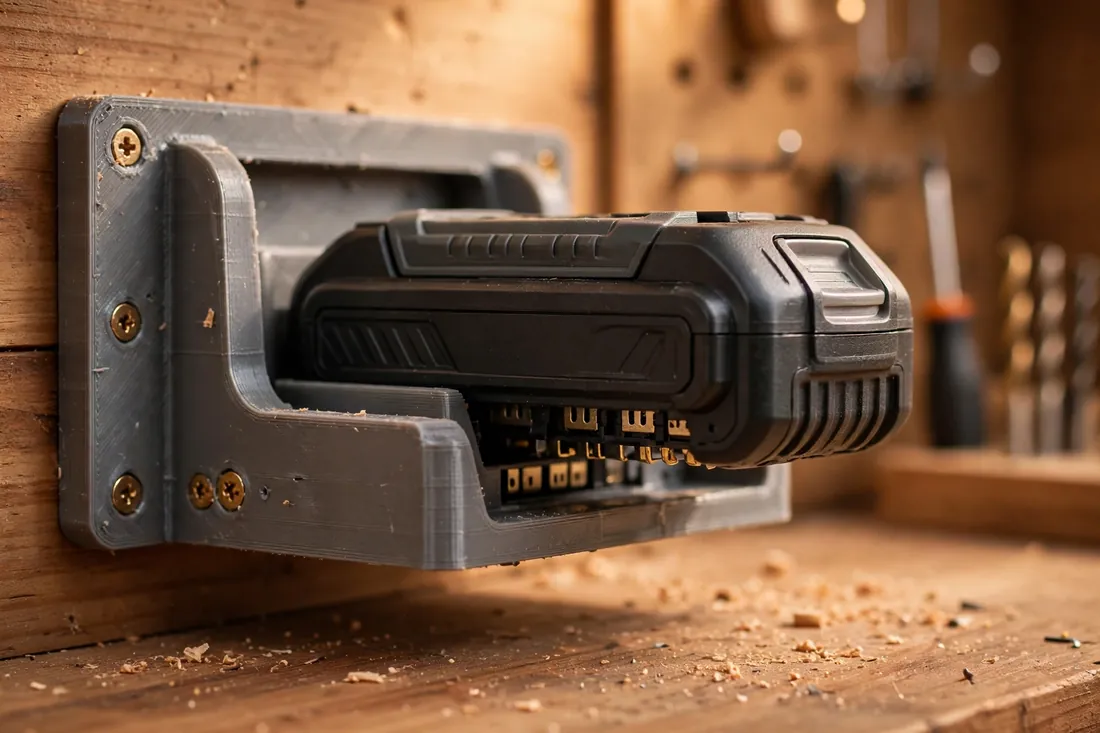
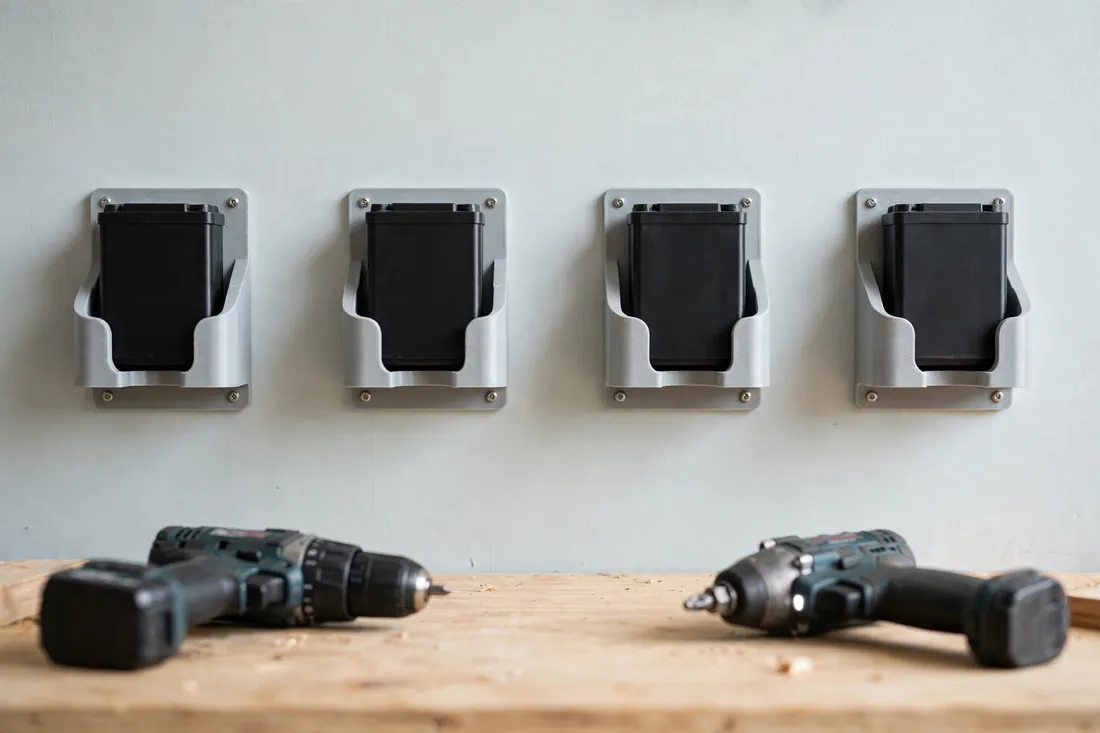
A cordless tool battery storage rack fixes the mess with a simple idea: a passive cradle for each pack. Print a set of matching wall holders, screw them to a stud, a backboard, or the side of a cabinet, and each battery gets its own home where it rests by its outer housing until you need it.
One point needs to be plain from the start. These holders are for storage only. The printed part must never touch, cover, bridge, or substitute for the battery’s terminals or contacts, and it must never be part of any charging setup. Store batteries in the holder only, and charge them only in the manufacturer’s charger, exactly as the tool maker directs. Keep the rack away from heat, too.
What You Need
Each holder is a small, sturdy cradle or shallow shelf. A full rack is just the same part printed several times.
Materials and tools
- A home 3D printer with a build area of roughly 180 mm in at least one direction
- PETG filament, strongly preferred for its toughness and heat tolerance in a garage
- The actual battery packs you want to store, for measuring and test fitting
- Calipers or a tape measure, and a pencil for marking stud positions
- Wood screws suited to your wall or backboard, plus a drill and a screwdriver
- A stud finder if you are mounting directly to a wall
- Sandpaper or a small file for cleaning up edges
Measure the packs you actually own rather than designing from a photo. Lookalike packs often differ by several millimeters.
Suggested print settings
- Layer height: 0.20 mm is a good balance; 0.28 mm is fine for a faster utility print.
- Walls: At least 4 perimeters — the side cheeks and mounting flange carry the pack’s weight.
- Infill: 40 to 60 percent, grid or gyroid. A battery pack is dense, and a flimsy holder will creep and sag.
- Top and bottom layers: 4 or more, especially on the shelf floor the pack rests on.
- Orientation: Print with the mounting flange flat on the bed and the cradle opening facing up, so layer lines run across the load, not along it.
- Supports: A well-designed open cradle needs none; avoid enclosed shapes that trap supports inside.
Print one holder first and live with it for a day before committing to a full set.
Design Considerations
Model the holder in any basic CAD program. Think of it as an open tray with two side cheeks, a back flange for screws, and a front lip — nothing that wraps over the top of the pack or reaches near its contacts.
1. Cradle the housing, nothing else
The pack should rest in or slide onto the holder by its outer casing and, where the design uses them, the broad housing rails on its sides. That is the whole interface. Leave the top and underside contact areas completely open and untouched, with clear air around them. Never model a plug, tab, or any feature meant to mate with the electrical contacts, and never let a printed wall cover them. If a draft comes close, redesign it with more clearance.
2. Size for a relaxed, honest fit
Measure the pack’s width, depth, and the height of its main housing, then add about 0.5 to 1 mm of clearance per side. The pack should drop in and lift out with one hand, without rocking or forcing. A holder that grips tightly will scuff the casing and tempt you to yank packs free, which is how holders get torn off walls. A small front lip, roughly 8 to 12 mm tall, is enough to stop a pack sliding forward on its own.
3. A mounting flange that does the real work
The holder is light; the pack is not. Give it a flat back flange at least 15 to 20 mm wide with two or three screw holes spaced vertically, so the load spreads instead of hanging off one screw. Countersink the holes so screw heads sit flush. On weak plasterboard, mount the rack to a plywood backboard fixed to studs first.
4. Spacing, airflow, and labels
Leave a clear gap between neighboring holders — about 15 to 20 mm is comfortable for fingers and lets air move freely around stored packs. Never stack packs tightly in a closed box. A flat pad on the front lip gives you a place to mark the platform or voltage with a paint pen, helpful when two tool families use similar-looking packs.
Step-by-Step: Printing and Assembly
- Measure each pack type — width, depth, and housing height — and note which packs share the same casing.
- Model one holder as an open cradle with side cheeks, a low front lip, and a tall, flat mounting flange, keeping every face well clear of the pack’s contact areas.
- Print a single test holder in your final material, not a leftover scrap of something weaker.
- Test the fit. The pack should settle in by its casing, sit level, and lift straight out without snagging.
- Adjust if needed. Widen a tight cradle by 0.5 mm, deepen a shallow lip, and reprint. One iteration is normal.
- Print the full set once the test holder earns its place, keeping settings identical so every holder matches.
- Clean up each print. Remove stringing, ease sharp edges with a file, and check the flange sits perfectly flat.
There is no assembly beyond mounting. If a holder needs glue, pins, or extra parts to stay together, simplify the design instead.
Step-by-Step: Mounting and Using the Rack
- Choose the spot carefully. Pick a cool, dry wall away from radiators, direct sun through a window, heaters, and any other heat source. Keep it within easy reach of the bench, but not above a charging station.
- Find solid fixing. Locate studs, or fit a plywood backboard across two studs and mount the holders to that.
- Mark a level line for the top of the flanges, then mark each holder’s position with your planned gaps between them.
- Fix the first holder with all of its screws driven snugly, and hang a pack in it as a real-world check.
- Mount the remaining holders along the line, checking each one with a pack before moving on.
- Load the rack by housing only. Set each pack into its cradle so it rests on its casing, contacts fully exposed and untouched, and confirm nothing printed presses on the top or underside contact areas.
- Keep charging separate, always. When a pack needs charging, lift it out and place it in the manufacturer’s charger, in a clear, ventilated spot away from the rack. Return it to the holder only once it is charged and cool.
Used this way, the rack is a simple visual inventory: a glance tells you how many packs are ready, and an empty cradle tells you one is out on a tool or on its charger.
Tips for Better Results
- Print in one color per tool family. Matching holder colors to pack colors makes grabbing the right platform instant.
- Angle the cradle floor very slightly back, about two or three degrees, so packs settle toward the wall instead of creeping forward.
- Test with your heaviest pack. If the largest pack sits happily, the smaller ones will too.
- Leave one spare cradle at the end of the row. Collections grow, and a spare slot stops a new pack ending up back on the bench.
Common Mistakes to Avoid
- Designing any feature that touches the contacts. This is the one unforgivable error. The holder holds the casing, full stop — no tabs, covers, or plugs near the terminals, ever.
- Using the holder while charging. A holder is not a charger dock, a charging stand, or part of a charging setup in any way. Charging happens only in the manufacturer’s charger.
- Mounting above a heat source. A rack over a radiator or in a hot, sun-baked corner is a poor home for stored packs. Move the rack, not the rule.
- Skimping on walls and infill. A sagging holder drops packs. Print these solid and mount them solidly.
- Copying a holder sized for a different pack. Lookalike packs differ. Measure yours and model your own original dimensions.
Care, Storage, and When to Choose an Alternative
Brush dust out of the cradles now and then, check the screws twice a year, and reprint any holder that cracks or flexes — they are cheap to replace. Store spares flat in a drawer, away from heat, so the flange stays true.
Sometimes a different answer is better. If your packs live in a van or site box, a padded carry case protects them better than any wall rack. For a large fleet, a steel rack or the tool maker’s own storage products suit better. And if you want faster charging, that is a conversation about the manufacturer’s chargers — never something a printed holder should be involved in. For a home workshop with a handful of packs, though, a printed rack is tidy, cheap, and exactly as capable as storage needs to be.
FAQ
Is it safe for a printed holder to hold a battery pack at all?
Yes, as a passive storage cradle — provided it follows the rule in this guide. The holder supports the pack by its outer housing only, leaves the terminals and contacts untouched and uncovered, and plays no part in charging. Store packs in the holder, charge them only in the manufacturer’s charger, and keep the rack away from heat.
Can I print a version that the pack clicks onto, like it clicks onto a tool?
Avoid any design that mimics the tool’s interface or engages the pack’s latch and contact area. A simple open cradle the pack rests in by its casing is the right shape. If you cannot lift the pack straight out with one hand, with clear air around its contacts, the design has gone too far.
Why PETG instead of PLA for these holders?
PLA softens and creeps at temperatures a sunny garage wall can reach, especially under a steady load. PETG stays tougher and more stable. Whichever you use, keep the rack away from direct heat sources, as covered above.
How many packs can one rack hold?
As many as you have solid fixings for. Each holder carries one pack and mounts independently, so the limit is your wall: a run fixed into studs or a backboard can comfortably hold four to eight packs. Add holders one at a time rather than building one long, flexible rail.
Conclusion
A tidy battery corner is not about buying more storage furniture. It is about giving each pack one honest, passive home — a cradle that holds its casing, respects its contacts, and stays completely out of the charging process. Print a set of holders, mount them somewhere cool and solid, and the bench pile disappears for good.
Start with a single holder, test it with your heaviest pack, and let the row grow from there.
If sorting the battery wall has you eyeing the rest of the bench, you may also enjoy our related guide, “Pegboard Tool Holders: 3D Print a Complete Organizer Set for Screwdrivers, Pliers and Wrenches,” which brings the same one-home-for-everything thinking to your hand tools.