Introduction
Inside corners are where baseboard jobs go wrong. Two boards cut at 45 degrees look perfect on the saw, then open up into a visible gap the moment the wall turns out to be 88 degrees instead of 90 — which, in most real houses, it is.
Trim carpenters solve this with coping: one board runs square into the corner, and the second board is cut to match the first board’s profile, so the joint follows the shape instead of fighting the angle. A coped joint stays tight even when the corner is not square, because the shaped end wraps over the face of its neighbor.
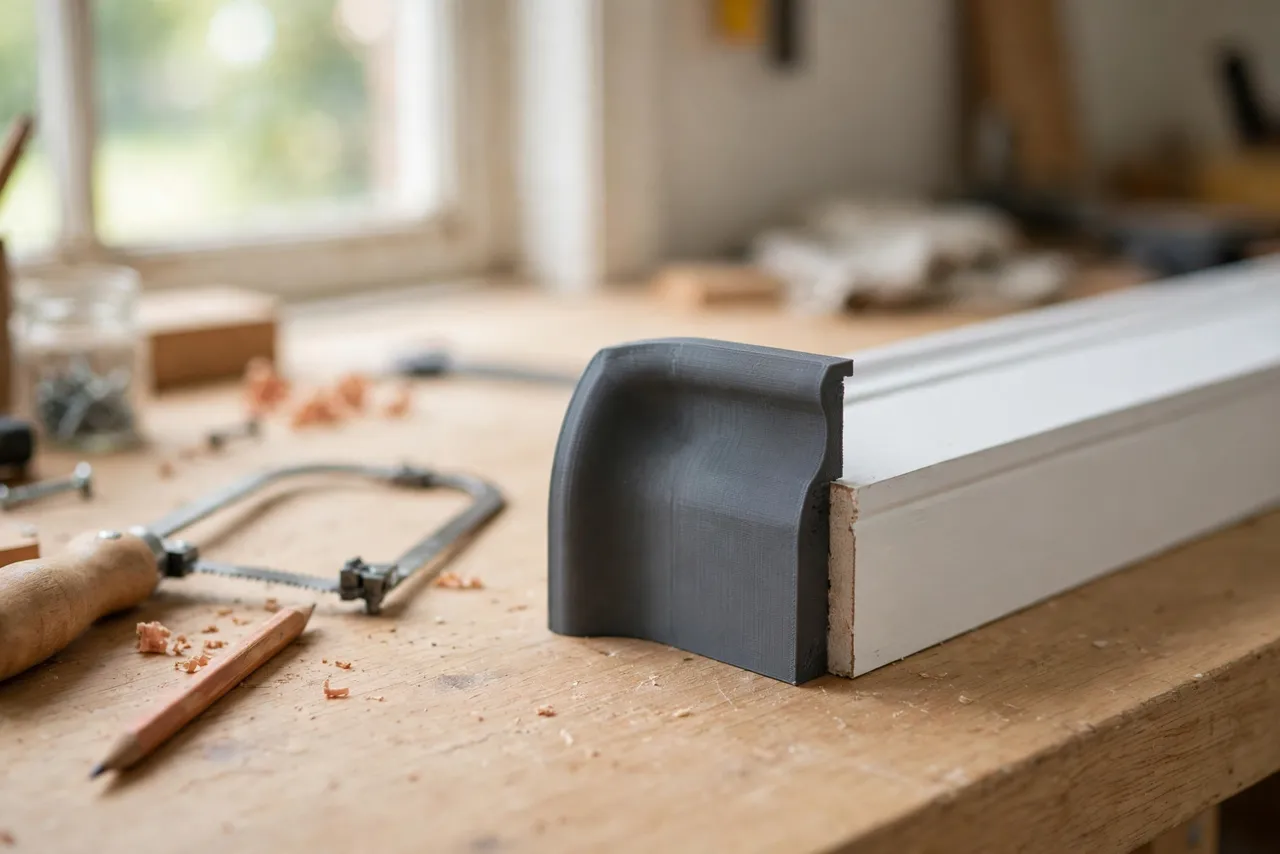
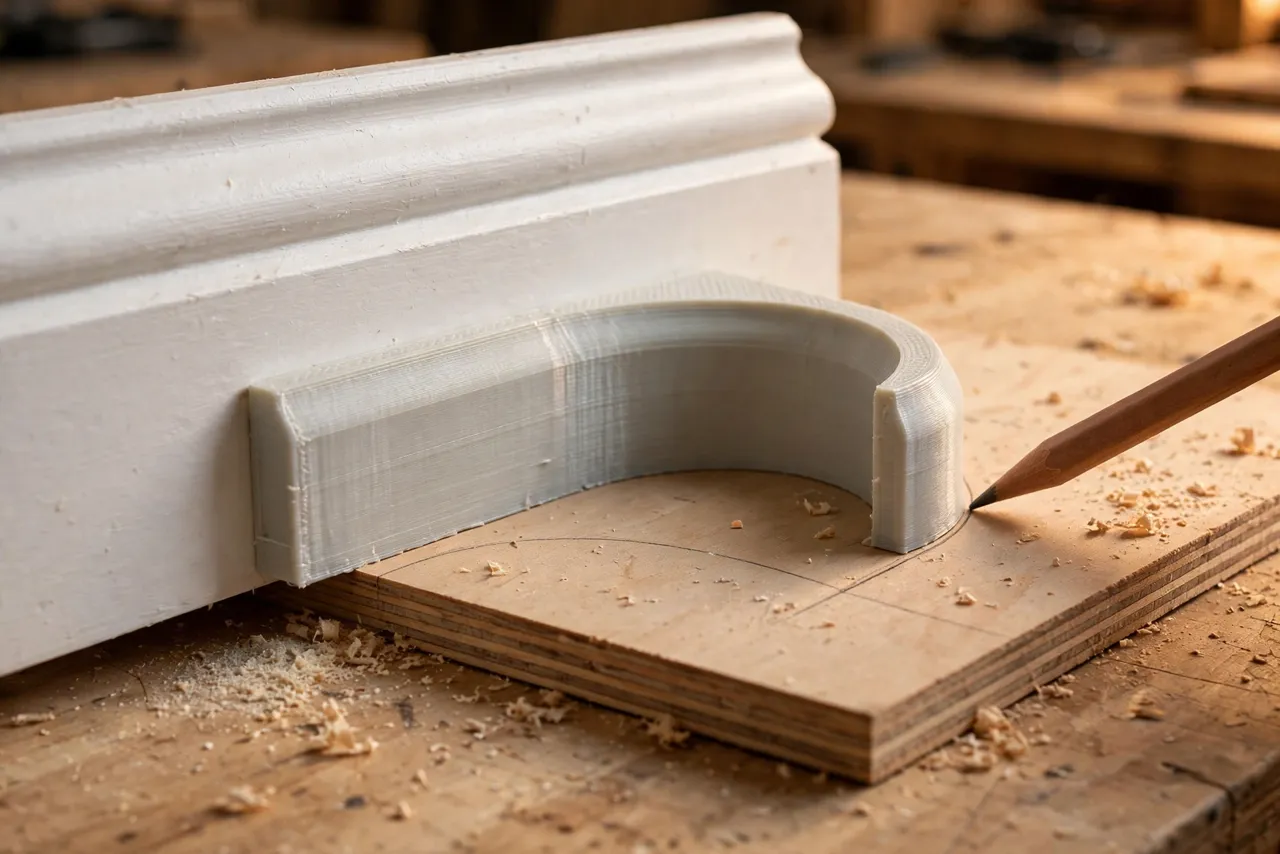
The hard part for a first-timer is seeing the cut. The profile of a baseboard — its curves, steps, and rounds — is tricky to trace freehand, and a wobbly line means a wobbly cut. A 3D printed coping template fixes that. You print a guide shaped to your exact baseboard profile, trace it onto the board, and follow the line with a coping saw. Think of the template as a layout aid only — it guides your pencil and your saw, and it never carries load or replaces a careful cut.
What You Need
This is a small, flat print, and most of the work is in measuring your baseboard profile accurately.
Materials and tools
- A home 3D printer with a build area of roughly 150 mm in at least one direction
- PLA or PETG filament; PETG is tougher if the template will live in a toolbox
- A short offcut of your actual baseboard, for tracing the profile
- Calipers or a small ruler, a pencil, and a contour gauge if you own one
- A coping saw with a fine blade, a file or sandpaper, and a utility knife
- A miter saw or hand saw for the initial 45-degree cut, plus a clamp
If you are also fitting door trim in the same room, the approach here pairs well with the ideas in “3D Printed Miter Cutting Guide for Trim, Molding and Small Stock,” which covers clean, repeatable trim cuts on small stock.
Suggested print settings
- Layer height: 0.16 to 0.20 mm for a smooth, accurate edge.
- Walls: 3 to 4 perimeters so the tracing edge stays crisp.
- Infill: 25 to 40 percent, grid or gyroid.
- Top and bottom layers: 4 or more for a flat, stable template.
- Orientation: Print flat, face down, for the cleanest edge.
- Supports: None needed for a flat template.
Print one test version and check it against the real board before you trust it on a finished piece.
Design Considerations
The template is essentially a negative of your baseboard’s face profile: a flat plate whose one edge carries the exact curves and steps of the board.
1. Capture the profile honestly
Press a contour gauge against the face of the baseboard, or trace the profile onto paper from an offcut and measure the key points with calipers. The flat back of the board, the main face, and each step or bead all matter. A profile that is off by even a millimeter will show up as a gap in the finished corner.
2. Build in a registration edge
The template needs a straight edge that sits flush against the back of the board or along its top edge, so it lands in the same place every time. Add a small lip or a flat reference side that registers against the board’s back face. Without registration, the template can drift while you trace, and the line drifts with it.
3. Keep the tracing edge thin and smooth
A thick, rough edge makes a fat, uncertain pencil line. Aim for a template about 3 to 4 mm thick with a clean, sanded tracing edge. If your print leaves a rough edge, a few passes with fine sandpaper will sharpen the line considerably.
4. Size it for the boards you actually have
Baseboards vary wildly — a 90 mm colonial profile and a 150 mm flat-stock board need different templates. Measure the board in your house, not a photo of one online. If you have two profiles in the home, print one template per profile and mark each with a paint pen so they do not get mixed up.
Step-by-Step: Printing and Assembly
- Measure your baseboard profile from an offcut, noting every step, bead, and curve.
- Model the template as a flat plate with the profile cut into one edge and a straight registration edge on the opposite side.
- Print a test version in PLA and hold it against the real board — the profile edge should match along its full length.
- Sand the tracing edge lightly until it is smooth and free of stringing.
- Check the fit by tracing onto scrap and cutting a test cope (see below) before touching a finished board.
- Print the keeper in PETG if you want a longer-lasting template, using the same file.
Step-by-Step: Using the Template to Cope a Corner
- Fit the first board square into the corner. It runs full length, cut square at the end, and butts into the wall. This board is never coped.
- Cut the second board at 45 degrees on the miter saw, as if you were making a mitered corner. This exposes the profile in cross-section.
- Lay the template on the mitered end with its registration edge flush, and trace the profile onto the face of the board with a sharp pencil.
- Cut along the line with a coping saw, angling the blade slightly back — about 5 to 10 degrees of back-cut — so only the front edge of the profile touches the first board. The back-cut is what lets the joint close tight.
- Test fit against the first board and mark any high spots with a pencil.
- Trim the high spots with a file, sandpaper, or a sharp utility knife, testing often. Small removals beat one big overcut.
- Nail the board in place once the joint closes with no visible gap, then check the corner from several angles and in normal room light.
Work slowly on the first corner. By the third, the routine — trace, cut, test, trim — feels natural, and the corners start looking like a professional did them.
Tips for Better Results
- Use a fresh coping saw blade. A dull blade wanders and tears, and no template can save a wandering cut.
- Cut slightly proud of the line, then sneak up on it. You can always remove more material; you cannot put it back.
- Back-cut generously on flat sections and more gently on delicate beads, which can snap if undercut too far.
- Test fit in place, not just on the bench. Walls are rarely flat, and the real corner is the only test that counts.
- Keep the template with the offcut it was made from, so you can re-check the profile later in the job.
Common Mistakes to Avoid
- Tracing from a photo or a different board. Profiles that look alike often differ by millimeters. Measure your own board.
- Skipping the back-cut. A cope cut square through the board will bind and gap; the back-cut is the whole trick.
- Cutting on the line instead of beside it. The pencil line is the finished face — cut just to the waste side of it.
- Forcing a tight cope into place. If it will not sit, find the high spot and trim it; forcing it can crack the board or dent the first piece.
- Forgetting which board gets coped. Only the second board is coped; the first always runs square into the corner.
Care, Storage, and When to Choose an Alternative
Brush off dust, store the template flat, and keep PLA away from heat. A dinged tracing edge can be sanded back once or twice; after that, reprint — it costs pennies.
A manufactured coping foot for a jigsaw, or a professional’s practiced freehand technique, may suit a whole-house trim job better. For a room or two, or for matching an unusual profile you cannot buy a guide for, a printed template is faster, cheaper, and accurate enough.
FAQ
Will one template work for every baseboard in my house?
Only if every board shares the same profile. Many homes mix profiles between rooms or after renovations. Measure each room’s board and print a template per profile.
Is PLA strong enough for a tracing template?
Yes, for tracing and light handling. PETG is the better keeper if the template will be tossed in a toolbox or used on a long job, but either material works as a layout guide.
Can I cope without a miter saw?
Yes. The 45-degree cut that exposes the profile can be made with a hand miter box or even a careful handsaw cut. The template still traces the same profile; only the rough cut method changes.
My coped joint still shows a small gap. What went wrong?
Usually the back-cut is too shallow, a high spot was missed, or the template shifted while tracing. Mark the contact points with a pencil, trim the high spots a little at a time, and retest — small, patient adjustments close most gaps.
Conclusion
A coped inside corner is one of those details that quietly makes a whole room look professionally finished. With a 3D printed template matched to your own baseboard, the hardest part — seeing the profile clearly — becomes a simple tracing exercise.
Print one for the profile in your home, practice on a scrap corner, and the next room of baseboards will go up tighter, faster, and with far less frustration.
If you are refreshing a whole room’s trim, you may also enjoy our related guide, “Crown Molding Cutting Jig: 3D Print a Nested Crown Holder for Perfect Corners,” which tackles the other corner that trips up most DIY trim jobs.